
A voice note is useful when ideas arrive faster than you can type. The problem comes later: the recording may contain the main idea, side thoughts, tasks, and unanswered questions in one long stream.
Start with a transcript—a written version of your recording. After checking it, ask ChatGPT for one main idea, up to three next actions, a Later list, and open questions. Side thoughts can stay in Later instead of becoming extra work.
Record one voice note, not a polished script
Use the voice recorder or transcription app you already have. Speak naturally for a minute or two about one project. Mention what you want to make, what you already know, what needs to happen next, and anything you are unsure about.
If your app creates a transcript, copy it after you finish. In Voice Memos on a supported iPhone, select the recording, tap More, then Copy Transcript. Availability depends on the device, language, and region.
If you have a supported paid ChatGPT plan and audio uploads are enabled in your workspace, attach a supported audio file and send this:
Transcribe the attached voice note. Preserve names, dates, quantities, and commitments as spoken. Do not summarize it or add tasks yet. Mark any words you cannot hear clearly as "unclear" rather than guessing.
If audio upload is unavailable, use your recording app’s transcript and paste the checked text instead. OpenAI notes that audio transcription can contain errors, so listen back to names, dates, quantities, and commitments before you use the text.
Check the transcript before organizing it
Here is a fictional voice-note transcript for a small content project:
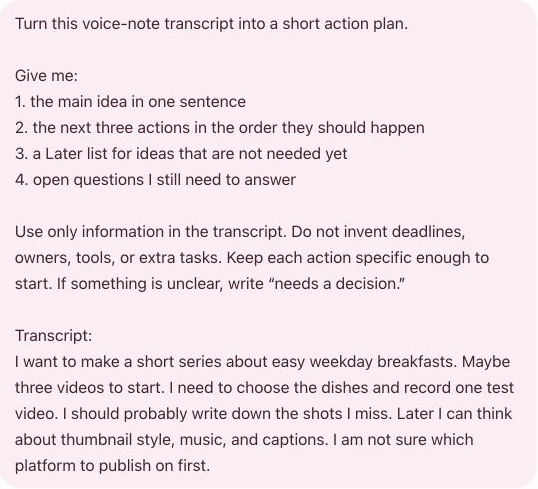
I want to make a short series about easy weekday breakfasts. Maybe three videos to start. I need to choose the dishes and record one test video. I should probably write down the shots I miss. Later I can think about thumbnail style, music, and captions. I am not sure which platform to publish on first.
Read your own transcript once and fix only errors that change the meaning. Keep uncertain words in brackets instead of guessing. Remove private details before pasting the text into another tool.
Ask for one idea, up to three next actions, and a later list
Start a new ChatGPT conversation. Copy the request below into the message box, replace the bracketed line with your checked transcript, and send it:
Turn this voice-note transcript into a short action plan.

Give me:
1. the main idea in one sentence
2. up to three next actions in the order they should happen; give fewer if the transcript supports fewer
3. a Later list for ideas that are not needed yet
4. open questions I still need to answer

Use only information in the transcript. Do not invent deadlines, owners, tools, or extra tasks. Keep tentative numbers and choices tentative. If they still need a decision, put them under open questions. Don't turn them into commitments. Keep each action specific enough to start. If something is unclear, write “needs a decision.”

Transcript:
[voice-note transcript checked against the original recording, with private details removed]
The first result should help you decide what to do next without turning a small idea into a large project plan.
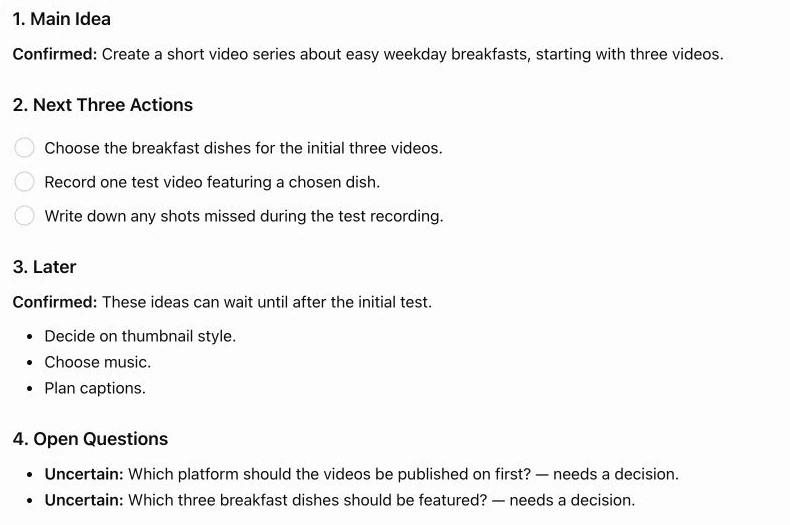
The screenshots below show a ChatGPT text demo using the fictional transcript above. No audio file was recorded or transcribed for this demo. Before the result screenshot was captured, ChatGPT was asked to keep the plan unchanged and use English throughout.
What the first result might look like
For the fictional breakfast-series transcript, a useful answer could be:
| Section | Suggested result |
|---|---|
| Main idea | Make a short video series about easy weekday breakfasts. |
| Next action 1 | Choose which breakfast dishes to feature. |
| Next action 2 | Record one test video for one of those dishes. |
| Optional after filming | Jot down any shots you missed, if it helps. |
| Later | Decide on thumbnail style, music, and captions. |
| Open question | How many videos should the series start with? Which platform should come first? |
The table leaves the number of videos open. In the earlier ChatGPT reply below, “maybe three videos” became a plan for three. When you check your own list, move any undecided ideas back to Open questions.
Make the first action smaller if it still feels vague
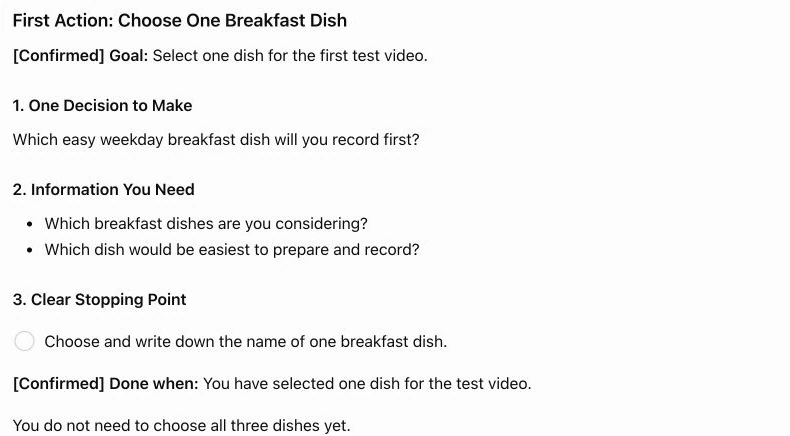
If “choose the dishes” still feels too broad, send this follow-up:
Make the first action small enough to start now. Give me one decision to make, the information I need, and a clear stopping point. Do not add a deadline.
In the text demo shown below, ChatGPT reduced the first action to choosing one breakfast dish for the test video. It named the decision, the information needed, and a stopping point: write down one selected dish. Check that the smaller action still follows your original intent before you use it.
Put the list where you already work
Copy the final actions into the notes or task app you already use. If you made the first action smaller, replace the original item with that version. Keep up to three supported next actions in the active list and put Later items in a separate section.
If this voice note is the start of an article, use the notes-to-draft workflow to separate observations, sources, and open questions before writing.
Keep the original recording until you have checked the transcript and action list. If ChatGPT changes a name, date, quantity, or commitment, correct the list from the audio rather than treating the transcript as the source of truth.
The short version
Use the prompt above on one checked voice-note transcript, then keep only actions you can trace back to the recording. If you can name the first step and know when it is done, you have a short plan you can start. If it still feels vague, use the follow-up to make that step smaller.