

Auto-generated video captions often need small, careful edits: a line is too long, a sentence breaks in an awkward place, or a name is spelled the way it sounded instead of the way it is written. ChatGPT can help you prepare a cleaner version, but your original timestamps should stay in control.
An SRT file is a text file with each caption’s number, start and end time, and words. Work on a copy of your SRT file. Ask for a revised section and a change log, review both, and then move only the approved text back into your video editor.
The October 30, 2026 walkthrough used two fictional captions in ChatGPT and a silent clip in Subtitle Edit Online. See the revised SRT.
What you need
- A copy of your own SRT caption file
- The correct spelling of names, products, and places in the video
- A new ChatGPT conversation
- The video editor you already use
If your editor exports an SRT file, keep the original untouched. Open a duplicate and paste a short section into ChatGPT. You can also save the working copy as TXT if you prefer to upload it; ChatGPT’s current file documentation lists TXT among supported text formats, subject to plan and workspace availability. [1]
Prepare a small test section
Start with 15 to 30 seconds of captions. A short test makes it easy to see whether ChatGPT kept the sequence numbers and timestamps unchanged.
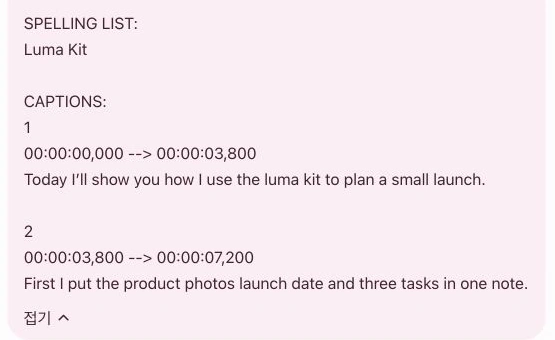
Here is a fictional SRT sample created for this guide:
1
00:00:00,000 --> 00:00:03,800
Today I’ll show you how I use the luma kit to plan a small launch.

2
00:00:03,800 --> 00:00:07,200
First I put the product photos launch date and three tasks in one note.
For this example, the creator’s spelling list says the fictional product name is Luma Kit.
First result from the caption test. ChatGPT changed “luma kit” to “Luma Kit” in cue 1 of the revised SRT. The cue still ran from 00:00:00,000 to 00:00:03,800. Before replacing any captions, compare the cue numbers and time ranges in both blocks.
Clean up video captions with this request
Replace the two bracketed sections with your spelling list and SRT captions. If you have no names or terms to check, write “none” for the spelling list:
Edit this short-form video caption sample.
Write the entire response in English, including headings, labels, and notes.

Rules:
- Keep every sequence number and timestamp exactly as written.
- Keep the speaker’s meaning and natural tone.
- Use no more than two lines per caption.
- Break lines at natural phrase boundaries.
- Fix only clear spelling, punctuation, capitalization, and readability issues.
- Use the spelling list below for names and terms.
- Do not add claims or words the speaker did not say.
- If a phrase is unclear, leave it unchanged and add it to “Needs review.”

Return:
1. the revised SRT in a code block,
2. a short change log,
3. a “Needs review” list.

SPELLING LIST:
[correct spellings of the names and terms in your video, or write none]

CAPTIONS:
[paste your SRT section here]
Use an SRT section for this walkthrough so you can compare the original sequence numbers and timestamp ranges.
What the test returned
For the recorded demonstration, I used Luma Kit as the spelling-list entry and the fictional sample shown here. Here is the SRT ChatGPT returned:
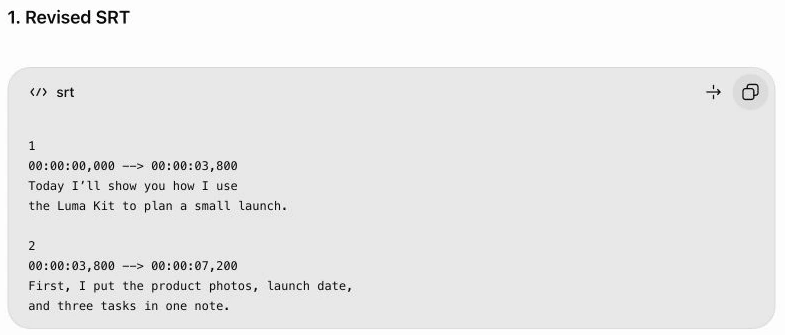
1
00:00:00,000 --> 00:00:03,800
Today I’ll show you how I use
the Luma Kit to plan a small launch.

2
00:00:03,800 --> 00:00:07,200
First, I put the product photos, launch date,
and three tasks in one note.
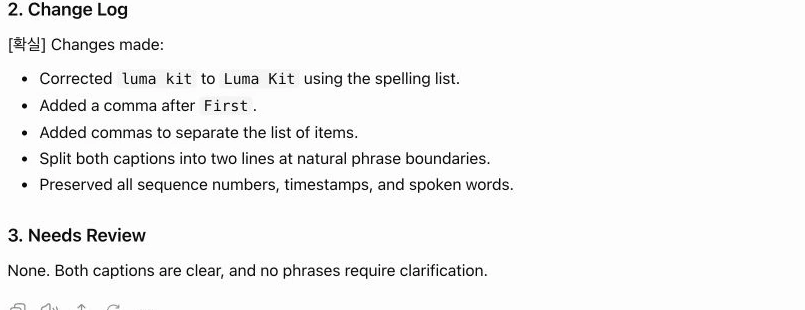
Change log
- Capitalized Luma Kit using the supplied spelling list.
- Added punctuation to make the second caption easier to read.
- Split both captions into two lines at natural phrase boundaries.
- Kept both sequence numbers and timestamps unchanged.
Needs review: None in this short sample.
This was an actual ChatGPT response to fictional text, not a transcript from a real video. I compared the two SRT blocks: both sequence numbers and timestamp ranges matched the original.
Check the changes before replacing anything
Compare the revised section with the original. Look at one type of change at a time:
- Timing: Sequence numbers and timestamps should match the original character for character.
- Meaning: The edited caption should still sound like the speaker.
- Names: Check every proper name against your spelling list or source material.
- Line breaks: Read the caption in the video preview. A two-line rule is useful only if the text is still easy to follow.
- Unclear audio: If the words are uncertain, listen again instead of accepting a confident guess.
If you’re working from an automatic transcript, check the transcript against the recording before polishing the captions.
If ChatGPT changed too much, send this:
Redo the section with a lighter edit. Keep the original wording unless there is a clear spelling, punctuation, capitalization, or line-break problem. Show every wording change in the change log.Apply the approved section in your editor
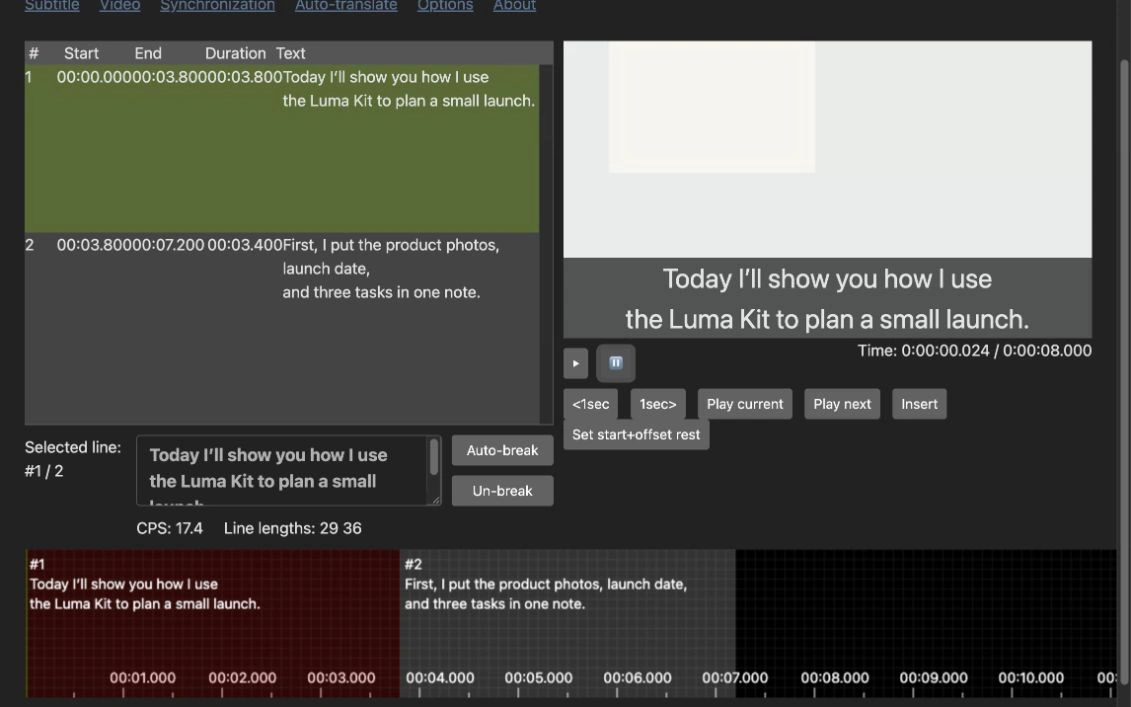
I also opened the revised SRT in Subtitle Edit Online with a silent test clip made for this example. The first caption appeared in two lines. There was no spoken audio in the clip, so this wasn’t a test of whether the captions matched a speaker.
Make the edit in a duplicate project or caption track when your editor allows it. Import or paste only the section you reviewed. Then play the clip twice:
- First without sound, to see whether the captions are easy to read.
- Then with sound, to check that each caption appears with the right words.
Do not replace the full caption file after testing only one small section. Repeat the same workflow in manageable chunks.
Keep a spelling list for the next video
Save a short reference list beside your project:
People:
[correct names]

Products and tools:
[correct spellings and capitalization]

Places:
[correct place names]

Words to leave as spoken:
[brand phrases, recurring expressions, or intentional slang]
Paste that list into the same request each time. It gives ChatGPT a clear reference without asking it to guess from sound.
In this two-caption test, ChatGPT corrected spelling, punctuation, and line breaks while keeping both timestamp ranges unchanged. Try one short SRT section, compare its numbers and times with the original, and watch it in your editor before replacing more captions.
How VEYREM researches and tests · Report an error