
Can ChatGPT summarize PDFs accurately enough to study from? I use it to turn Korean tax-law PDFs into study outlines. One reply looked organized, but it left out some of the rules I needed. Asking for more detail helped, but I still needed the original pages to check the rules.
For a first check, choose one rule in the summary and find its source passage. Compare when it applies, any exception, and every number with its unit. If one is missing, add it before studying from that note. You can try this with a few pages of any document where the wording matters.
Try the two-page visitor guide first. Check the trail distance on viewer page 1 and the leash rule on viewer page 2.
The conversation and annotated notes shown here are English-localized editorial reconstructions of my Korean study material, not original English images.
Start with pages 1–2 and one rule
- Open the two-page NPS guide. Expand the recorded notes-and-summary request below, copy it, and send it to get a one-sentence summary of those page-labeled notes.
- Find the pet rule on viewer page 2. Compare the summary with the source: does it retain the 6-foot maximum and the requirement to keep pets leashed at all times?
- The recorded first reply below kept the length limit but dropped the continuous-leash condition. Restore that condition in the note, then compare it with page 2 again.
This repeats a pasted-notes summary check; the PDF was not uploaded in the recorded exchange. For your own document, choose a file and short page range first, then check one rule the same way.
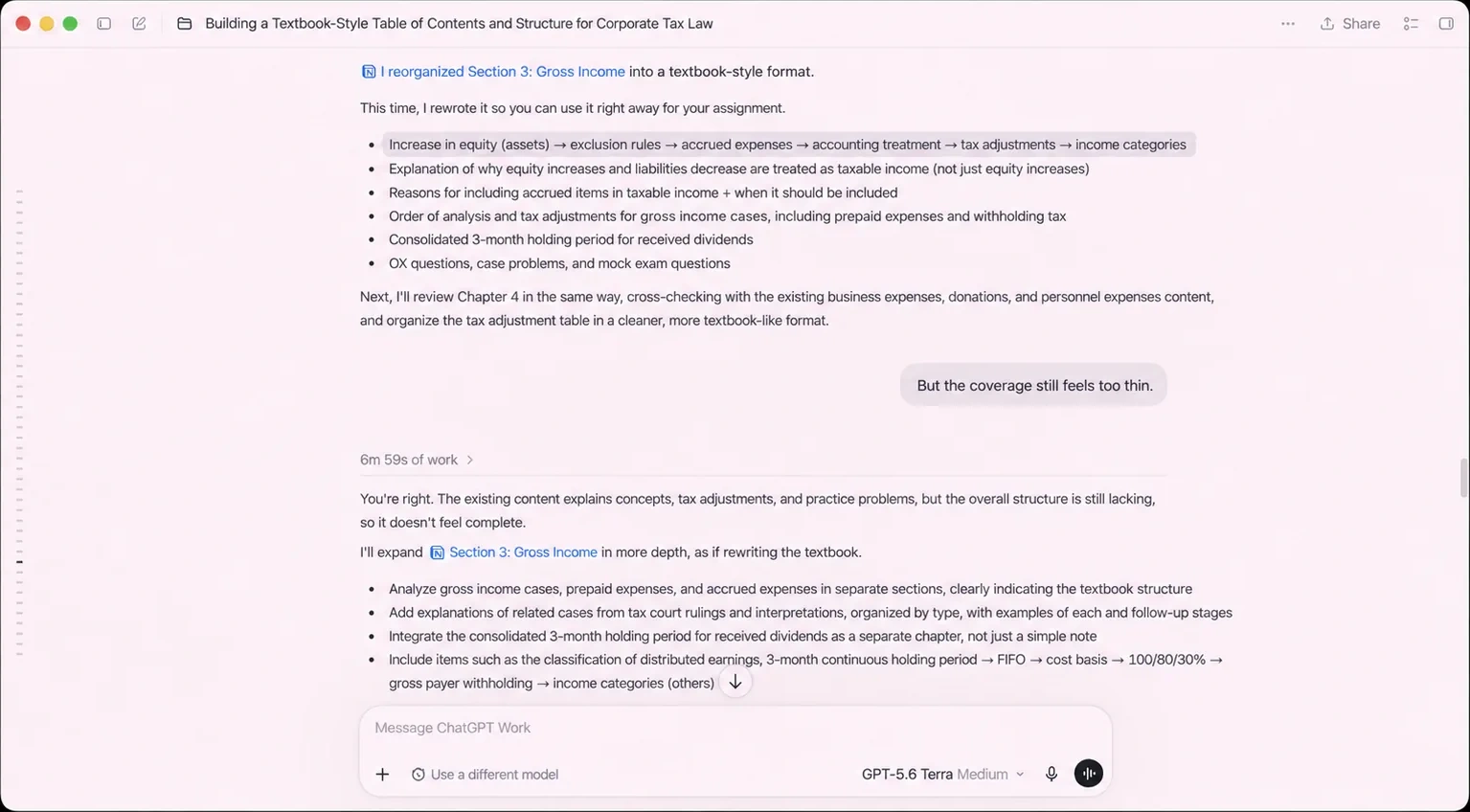
The outline that needed another look
In a ChatGPT Work conversation, I asked for a more textbook-like structure for Section 3: Gross Income. Here, gross income is the name of a section in my tax-study material.
The answer grouped increases in equity, exclusion rules, accounting treatment, tax adjustments, and income categories into a sequence.
That gave me a starting structure. Then I looked at the coverage and replied:
“But the coverage still feels too thin.”
ChatGPT expanded the outline in its next reply. I could see more of the subject, though I still needed to compare the rules with the source pages.
Can ChatGPT summarize PDFs accurately? What I mark while reading
The notes illustrate what I marked for study; they are not current tax guidance.
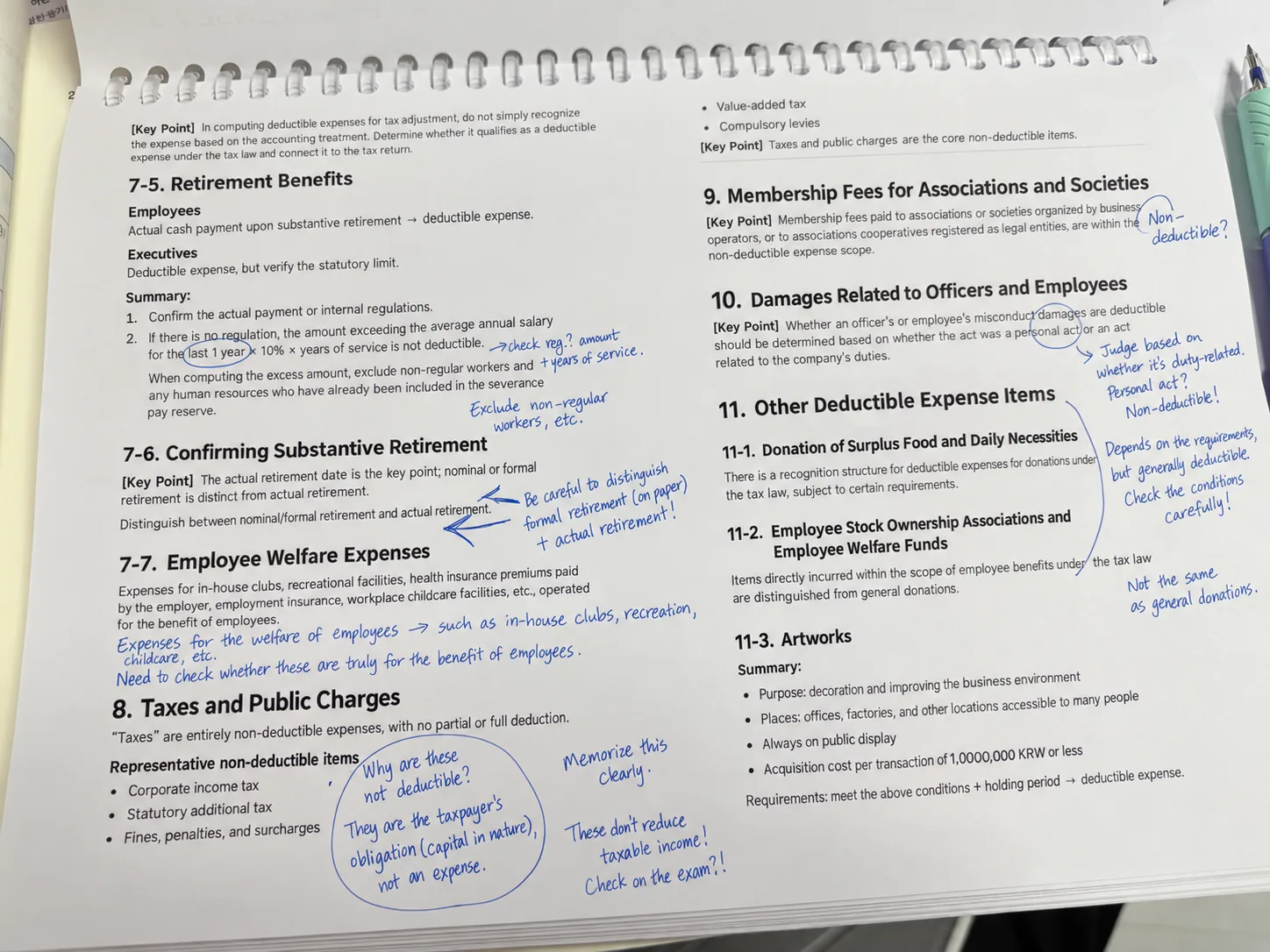
My study page has circles, questions, and reminders beside topics such as retirement benefits, employee welfare expenses, taxes and public charges, membership fees, and other deductible expenses.
For example, the retirement-benefits section has “last 1 year” circled, with a reminder to check the year, amount, and years of service. That’s the kind of detail I want beside the outline when I return to the source.
I keep the original page beside the summary when I’m checking a definition, exception, number, time period, or calculation. Those details can change the answer. You can use the same approach with a textbook or another document where the wording matters.
A public two-page check
My tax-study file is private. For a comparison readers can repeat, I checked the National Park Service’s Hovenweep Visitor Guide, pages 1–2, on October 23, 2026, then wrote the three page-labeled notes below.
I pasted my notes into a fresh ChatGPT Work conversation using GPT-6.1 Sol at Medium. That first answer summarized the notes I gave it. I tried attaching the PDF itself in a separate check below.
Exact first input
Recorded request. The notes are my wording, checked against the PDF. To repeat this text-summary check, send the whole block in a fresh conversation.
Use only the page-labeled notes below. Summarize them in one English sentence of no more than 25 words. Return only the summary. Do not browse, call tools, or use outside information.

NOTES
Page 1 — roads to the outlying sites: Some stretches are rough dirt and gravel that are not maintained. The guide recommends a vehicle with high ground clearance for visiting those sites.
Page 1 — Square Tower: A self-guided loop goes around the largest archaeological site; its length is 2 miles (3.2 km).
Page 2 — pets: Pets may go in the monument and on trails. Keep them on a leash all the time, with a maximum length of 6 feet.
First reply — 23 words:
High-clearance vehicles are recommended for rough outlying roads; Square Tower’s self-guided loop is two miles; pets require leashes no longer than six feet.
It loses maintenance status, kilometers, site scope, and the continuous-leash condition. I asked for those details back.
Exact follow-up request
Check your sentence against the same supplied notes. Replace it with three bullets, one per topic, in no more than 70 words total. Keep each recommendation, number with its unit, and condition that would matter when following the note. Include the supplied page number in each bullet. Do not add current travel advice, outside facts, or a claim that you opened the PDF. Return only the revised bullets.Revised reply — 70 words, including page labels:
- Page 1 — Roads: Some stretches to outlying sites are rough, unmaintained dirt and gravel; the guide recommends a vehicle with high ground clearance.
- Page 1 — Square Tower: A self-guided loop around the largest archaeological site is 2 miles (3.2 km) long.
- Page 2 — Pets: Pets are allowed in the monument and on trails; keep them leashed at all times, with a maximum leash length of 6 feet.
I opened the guide and checked each bullet against its page before keeping the revision. The first reply and the follow-up used different word limits and formats, so I used the second reply to fix this set of notes. Check the current park guidance before using the guide to plan a visit.
November 3: I attached the PDF itself
I downloaded the same two-page NPS guide as veyrem-hove-visitor-guide.pdf, attached it in a new ChatGPT web conversation, and sent the suggested prompt below with the file name, viewer pages 1–2, and SOURCE TEXT: Attached PDF filled in. The interface showed Medium; I did not record a model name. This was a file-upload check, separate from the October 23 pasted-notes exchange.
The first reply placed the pet rule under “Protect the Past for the Future,” viewer page 2. It said pets were allowed in the monument and on trails but had to remain leashed at all times, with a maximum leash length of 6 feet. I opened page 2 and compared it with the source wording: must be leashed (six-foot maximum) at all times
. Both conditions survived this reply, so I did not ask for a correction to that rule.
I also checked the Square Tower loop against viewer page 1: the reply retained 2 miles (3.2 km). The guide has no identifiable printed page numbers; the reply used PAGE UNKNOWN for that field while retaining the viewer page. That kept the two kinds of page number separate.
Those checks passed for these selected details in one readable, two-page file. I did not verify every line of the outline or test a scanned textbook, a complex table, another account, or another plan. For your file, compare one rule with its original page before moving on; a successful upload alone does not settle accuracy.
Try one file and a few pages first
Open the PDF on your computer and choose a short section. Use its headings to decide the range, rather than asking ChatGPT to summarize a whole stack at once.
In the ChatGPT web layout checked November 3, 2026, open a conversation, click +, and choose the file-upload option. Attach one PDF and wait until its file chip appears before sending the request. If uploads are unavailable, copy the chosen pages into the message and label each with its viewer page number. A pasted excerpt supplies only that text, not the rest of the file.
Write down the file name and page range. Be careful with page numbers: the viewer may call a page “12” while the printed page says “8,” because the file includes a cover and contents pages.
Paste this suggested prompt after attaching the file. Replace each bracketed field with your details—for example, biology-notes.pdf and 12–14. If you’re pasting text, put it under SOURCE TEXT and keep the page labels; otherwise, write Attached PDF there.
Suggested prompt. Paste into the ChatGPT message box after attaching your PDF. Have one file and a short viewer-page range ready; paste page-labeled text if needed. Replace the file, page range, and SOURCE TEXT fields.
Please help me make a study outline from [FILE NAME], using PDF-viewer pages [START–END] only.
The viewer page is the page’s position in the file. The printed page is the number written on the page itself.

I want to check the outline against the original later, so for each topic please include:
- the section heading
- the viewer page and printed page, when you can identify them
- the definition, condition, exception, number and unit, or calculation order worth checking
- a short source passage in its original language, plus a phrase I can search for

Please use only the attached PDF or the text below. If a page number is unclear, write PAGE UNKNOWN. If you cannot read the text, write TEXT UNREADABLE rather than guessing. If I pasted only an excerpt, please say that you checked only that excerpt.

SOURCE TEXT: [ATTACHED PDF OR PAGE-LABELED TEXT]
The result should give you places to look, not just topic names. Open one listed page and search for the quoted phrase with Command-F on Mac or Ctrl-F on Windows.
If search finds nothing, look at the listed page yourself—scanned text and line breaks can interfere with search. If the wording still doesn’t match, paste the correct passage and ask:
Revise this point using only the text below. Keep its conditions and units, and remove the unsupported part: [PASTE THE PASSAGE].Fix that point before studying from it.
Check for missing topics and conditions
Keep the PDF’s headings beside the outline. Is a named topic missing? Does a rule include its exception? Is the number copied with the right unit?
Here’s a made-up example. Suppose your notes say, “Submit the report within seven days after the lab session. Students with an approved extension use the revised deadline.”
If ChatGPT shortens that to “Submit the report within seven days,” two details disappear: when the seven days start and who gets a different deadline. Keep both in your study note: “Submit within seven days after the lab session, unless an approved extension gives you a revised deadline.” That’s the sort of gap to look for when you compare the outline with the PDF.
You can ask a more focused follow-up:
Suggested prompt — follow-up. Paste into the same ChatGPT chat. Keep the outline in the conversation and prepare the matching source headings and passages. Replace HEADINGS AND PASSAGES.
Please compare your outline with these headings and source passages.
For each heading, tell me whether it is covered, partly covered, or missing. Show the source passage and the matching outline point when there is one.

If something is missing, name the exact topic or condition. Please add only what the text supports, and say when nothing is missing. I am sharing only these pages, so do not assume anything about the rest of the PDF.

HEADINGS AND PASSAGES: [PASTE THE RELEVANT TEXT]
When ChatGPT flags a missing detail, find it in the text you pasted. Add it if the source supports it. If the outline already covers the rule, you don’t need a longer version.
When a scan or table is hard to read
Some PDFs contain pictures of pages instead of readable text. OCR means turning those pictures into text you can search or copy.
For a specific chart: attach a clear image of the chart, including labels and footnotes, or paste readable values. The current image-input guide describes attaching images on the web. This avoids relying on an unverified assumption that a saved reference file and a directly attached PDF expose the same visual content.
Earlier PDF-processing guidance—October 28 documentation check
Checked October 28, 2026: OpenAI’s current upload guide says ChatGPT can analyze text and images in directly attached PDFs, including in GPT or project chats. Saved GPT knowledge and project files are handled differently: embedded images may not be included automatically. For a specific chart, attach the PDF directly to the chat or upload the image separately. Availability and limits depend on your account and settings.
This earlier upload-guide note was not reverified as an all-plan retrieval matrix on October 30. The first exercise uses the pasted notes recorded above.
The October 28 check of OpenAI’s data-analysis guidance noted the warning that exact values may be extracted unreliably from scans and complex layouts. If a page is unreadable, supply a clearer image when available, or paste readable text. Compare numbers, minus signs, column headings, and footnotes with the original yourself.
For a table, separate reading from explanation. Try:
Copy this table's column headings, row labels, units, values, and footnotes. Mark any unreadable cell UNREADABLE; do not guess or explain the table yet.Compare that copy with the page, correct any cells, and then ask for an explanation of the corrected table.
For a worked example of checking the calculation after reading the inputs, see how I checked a missing step in a ChatGPT study answer.
Would I study from a ChatGPT PDF summary?
I wouldn’t assume a ChatGPT PDF summary is accurate just because it looks organized. In this example, the first outline was thin enough that I asked for fuller coverage. I’d use the expanded version as a starting outline and check the rules and numbers against the PDF before studying from it.
Choose one short section and compare its headings with the outline. For each rule you’ll use, ask: when does it apply, who does it apply to, and is there an exception? Check the numbers and units too.
If something is wrong or missing, paste the original passage and use the correction request above. If the page can’t be read, get readable text first. Work through the details you need; finding one correct point doesn’t tell you whether the others are right.
Once those notes are checked, the Study Mode guide shows how to practice answering one question at a time.
Evidence and check dates
- Tool: ChatGPT Work for the private outline and the separate public-notes summary; manual checks against the PDF.
- Model: Private-session model not recorded. Public-notes exchange: GPT-6.1 Sol, Medium, ChatGPT Work web.
- Dates: Original study date not recorded. Public-notes summary and revision: October 23, 2026. Source pages and earlier upload guidance checked October 28. General attachment/image guidance and the web upload control checked October 30, 2026; no new model run.
- Input: Private Korean study material; separately, three editor-written page-labeled notes checked against the public two-page guide.
- What was checked: Private outline: fuller coverage requested. Public notes: actual 23-word summary, exact follow-up, and 70-word revision checked against the source.
- November 3 upload check: Attached the two-page public guide in ChatGPT web, using the suggested prompt with the actual file name and pages 1–2. The interface showed Medium; the model name was not recorded. Checked the pet rule on viewer page 2, the loop distance on page 1, and the distinction between viewer and printed page numbers. These selected details matched; no correction was needed for the pet rule.
- Not checked: No public audit of the private file, line-by-line check of the full outline, model accuracy score, scanned-file comparison, all-plan retrieval test, or current tax/travel advice.
Source status: The NPS guide, pages 1–2, and earlier upload/data-analysis check remain dated October 28, 2026. On October 30, Use ChatGPT and Image inputs were rechecked for the basic attachment route; the web upload control was inspected. No new upload was run during that October documentation check. The separate November 3 file-upload check is recorded above; private tax rules, current travel conditions, and per-plan visual retrieval remain unverified.