
Regular chat is a useful starting point for organizing notes. Study Mode is designed for working through a topic with questions and feedback. The one-question request below also works in regular chat if Study is unavailable.
For a first practice session, one short paragraph is enough. The result to look for is a question you can answer before ChatGPT shows the solution.
These are starting points for different tasks, not results from testing the same task in both modes. Open Study and try one question, or organize a passage in regular chat.
On this page
Choose a short passage you can check
A whole chapter gives you a lot to review at once. For a first session, one definition, rule, or short worked example is enough. Choose a passage you can keep open beside the chat so you can check what the feedback refers to.
I’ll stay with economics for the example: why a price change and a change in buyers’ tastes affect demand differently. You can use the same method with a short paragraph from your own textbook or notes. You don’t need to study economics to use the request.
Choose Study Mode or regular chat for practice
The official setup guide explains how to select Study. I’ve kept the setup checks and regular-chat practice results in Evidence and check dates below.
- Sign in and open a regular ChatGPT conversation, outside a Project or Temporary Chat.
- Open the Study entry page, or type @study in the message box and select Study from the suggestions. Check that Study is selected before sending.
- Paste the request below with one short passage. If Study is unavailable, use the same request in regular chat and check that the reply asks one question and waits.
Typing the word “Study” alone does not turn the mode on. The official guide describes these entry routes; menus can vary by account and app version.
Earlier shortcuts, mobile steps, and availability notes—October 28 documentation check
These are earlier guide notes, not a new test across devices or plans. They are optional context rather than prerequisites for the request below.
On the web, sign in and open a regular conversation. Type @study, or open + and search study, then select Study. Check that the Study token appears before sending; typing the shortcut alone does not activate it. You can also open ChatGPT’s Study Mode page.
On iOS or Android, open +, search for Study if needed, and select it. The guide lists web, iOS, and Android across ChatGPT plans. Use a regular conversation; Study is unavailable in Temporary Chats, GPTs, or Projects. Menus can vary by app version.
Study Mode can guide you with questions and feedback, but may still give a direct answer. Ask it to wait when you want to answer first. To return to regular chat, remove the selected Study token from the composer.
The request below goes in that ChatGPT conversation, with Study selected if available. Only the three bracketed parts need your own text: your goal, source title and page, and a short passage. Once those are filled in, the whole request is ready to send.
Help me practice the passage below.
My goal: [the idea I want to understand or explain]

Ask me one question based on the passage, then wait for my answer. Do not show the solution first.
After I answer, explain what is correct or missing using the passage. If I ask for help, give one hint and wait for another attempt.
Use everyday language and explain new terms. Do not grade my answer using facts outside the passage. Say when the passage is not enough.

Source and page: [my textbook or note title and page, or “no page number”]
Passage: [one short paragraph from my notes or textbook]
The first reply should ask one question and wait for your answer. If it gives the answer too, send this in the same conversation:
Ask me one question only and wait for my answer. Give me a hint only if I ask.Economics example with the brackets filled in
This passage was written for this guide. The filled-in request below is a practice example, not the request from my earlier economics chat.
Help me practice the passage below.
My goal: explain the difference between a price change and a change in demand

Ask me one question based on the passage, then wait for my answer. Do not show the solution first.
After I answer, explain what is correct or missing using the passage. If I ask for help, give one hint and wait for another attempt.
Use everyday language and explain new terms. Do not grade my answer using facts outside the passage. Say when the passage is not enough.

Source and page: Economics practice passage written for this guide; no page number
Passage: A demand curve shows how much of a good buyers want at different prices. If only the good's own price changes, the quantity demanded—the amount buyers want at that price—changes. That is a move along the same curve. A change in something else, such as buyers' tastes, can shift the curve. If buyers want more at every price, demand increases and the curve shifts to the right.
Trying to answer before looking back at the passage is active recall—remembering and explaining an idea before reading it again. In the economics example, an answer that says a price drop shifts the demand curve needs feedback about moving along the same curve. A reply that only says “Wrong—try again” leaves you without a reason for the correction.
If your notes need organizing first
Sometimes the notes need sorting before practice can begin. For that, the request below goes in a regular ChatGPT conversation without Study selected. The bracketed space is for one short passage from your notes or textbook; the rest is ready to send.
Organize this passage into a short study outline.
Keep the main idea, any conditions or exceptions, and important supporting details.
Beside each point, include a short phrase from the passage so I can find it again.
Do not add material from outside the passage.

Passage: [one short passage from my notes or textbook]
Check the outline beside the passage you supplied. For the economics example, it should keep a change in the good’s own price separate from a change in buyers’ tastes. With your own notes, look for any condition or exception that changes the rule. If one is missing, send this in the same conversation:
Revise the outline using only my passage. Restore any missing condition or exception, and keep the accurate points. Quote the source phrase beside each restored point. If the passage does not supply a condition, say so instead of adding it.This request uses text pasted into the chat. For a PDF you want to upload instead, the PDF outline guide covers the file and page instructions, along with checking that the reply points to the right part of your source.
Use the checked outline to choose what you want to practice next.
Check what the reply gives you
In one free regular-chat session, I asked for a more detailed supply-and-demand explanation with a graph. The reply organized the topic into demand, supply, and the difference between changes in quantity and shifts in a curve. It also said it would use a graph, but none appeared in the visible reply.
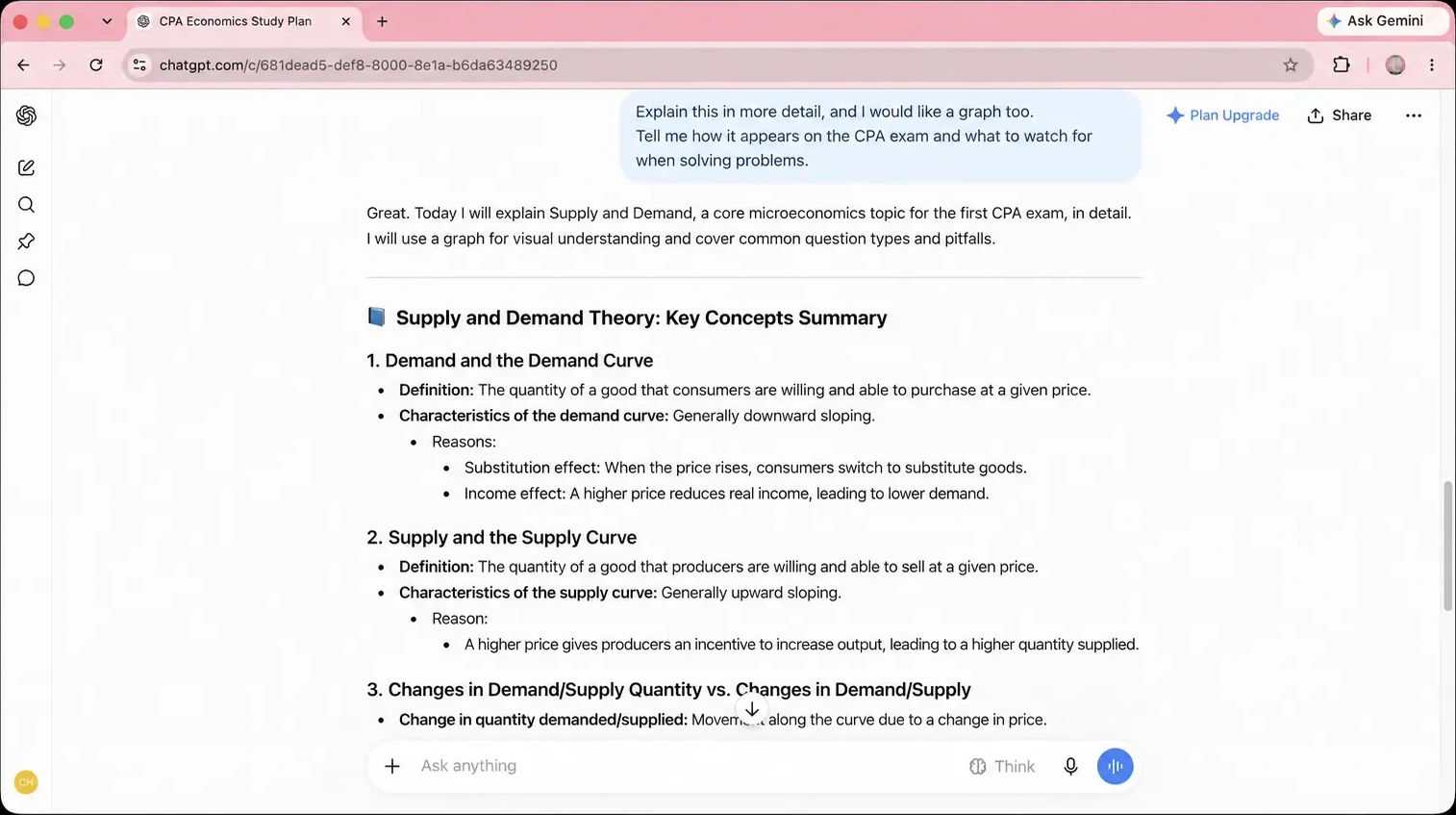
I could use the written explanation, but I still had no graph to look at. The example shows one regular-chat reply. I’d use it to check whether the reply included everything I asked for.
For studying, that means checking the reply against the job you gave it. If you wanted an outline, does it keep the important points from your notes? If you wanted practice, does it leave you a question to answer? A clear explanation can help you get started, but you’ll still need a chance to try explaining the idea yourself.
| Task | Where to start |
|---|---|
| Organize a chapter into a short outline | Regular chat |
| Keep definitions, conditions, and source locations together | Regular chat |
| Explain an idea without looking at the notes | Study Mode |
| Practice one question at a time | Study Mode |
| Verify a definition, assumption, or calculation | The original source |
ChatGPT Study Mode vs regular chat: which should you start with?
For notes that still need sorting, I’d start with the regular-chat outline request. For practice, Study Mode is an option, with the same one-question request available in regular chat too. One paragraph is enough to begin: a question, your own attempt, then feedback you can check against the passage.
If the feedback adds a rule you didn’t supply, send this in the same conversation:
Quote the part of my passage that supports this correction. If the passage does not settle it, say so instead of marking my answer wrong.Compare the quoted passage with your notes before accepting the correction.
For a worked calculation check, see how I checked a missing step in a ChatGPT study answer.
Evidence and check dates
- Tool: Regular ChatGPT chat for the recorded supply-and-demand session; Study Mode guidance is separate.
- Model: Model not recorded; the recorded regular-chat session used a free account.
- Dates: Original session date not recorded. Record reviewed October 23, 2026. Setup documentation checked October 28. Web Study entry inspected again October 30, 2026; no new question run or mode comparison.
- Input: A request for a fuller supply-and-demand explanation with a graph.
- What was checked: Recorded observation: the visible regular-chat reply supplied an explanation but no graph. The practice passage and prompts are suggested examples.
- Not checked: The same task was not run in Study Mode. No claim about which mode draws better graphs or improves learning was tested.
Source status: The official Study guide was rechecked November 2, 2026. On October 30, the web entry displayed Study selected in the checked account. Mobile controls, all-plan availability, and learning outcomes were not retested. The recorded regular-chat reply remains a separate historical observation.
Reader-request check — November 2, 2026: The revised practice, outline, and follow-up requests were run in regular ChatGPT with a short fictional library note. The first reply asked a question and waited; later replies gave a hint, distinguished unsupported information from a wrong answer, and restored a deliberately removed condition in an outline. The filled-in economics example also asked a question and waited. Study selection could not be confirmed in this account, so these checks cover the regular-chat fallback. They do not compare modes or measure learning outcomes.