
Can ChatGPT summarize PDFs accurately? I use it for a first-pass map, not as a replacement for the source.
I use ChatGPT with a stack of Korean tax-law PDFs when I am building study notes. The first pass gives me something genuinely useful: a map of a large subject before I start deciding what deserves a closer read.
It does not give me finished notes by default.
The dangerous part is that the first pass often looks clean enough to feel finished. That is exactly when I slow down. When several pages get compressed into one neat outline, a condition, limit, exception, or sequence can disappear without making the summary look obviously wrong.
For tax material, that is the part I care about most.
The subject happens to be Korean tax law, but the failure mode is the same for dense PDFs in finance, school, research, or technical work: the summary can look complete while a condition disappears.
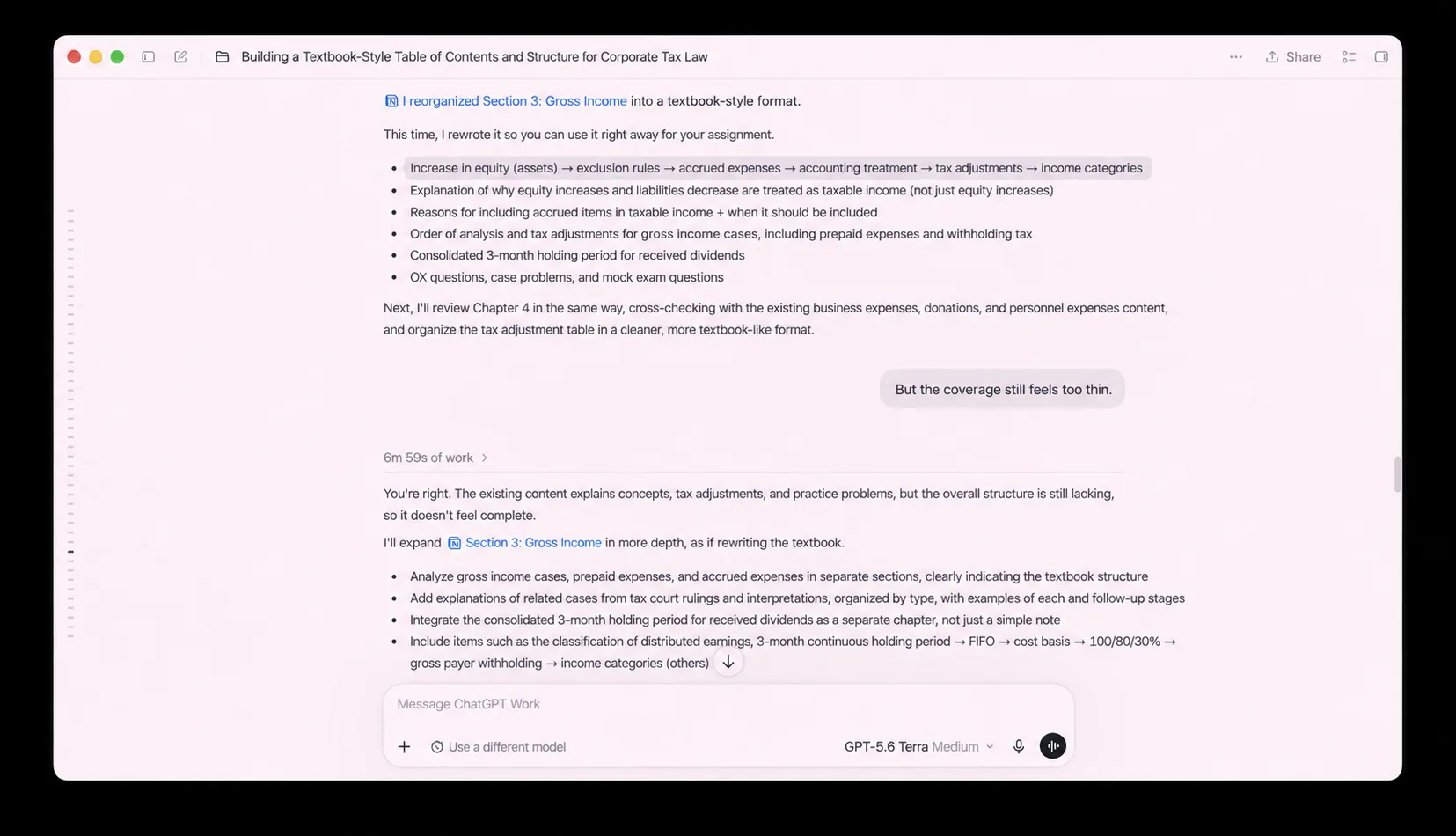
Table of Contents
Can ChatGPT Summarize PDFs Accurately for Tax Study?
In this Work conversation, I asked ChatGPT to turn Section 3: Gross Income into a more textbook-like structure. The first output sorted related material into a sequence: increases in equity, exclusion rules, accounting treatment, tax adjustments, and income categories.
That was useful. It gave me a starting structure for a pile of source material.
Then I looked at it and had the exact reaction I was trying to avoid: “But the coverage still feels too thin.”
That is the part I remember now. The outline looked organized. It still was not enough to study from.
The revised answer expanded the structure, which helped. But the important step was not asking for a longer summary. It was deciding which original pages, rules, and examples still needed to be reopened.
The notes I still make against the source
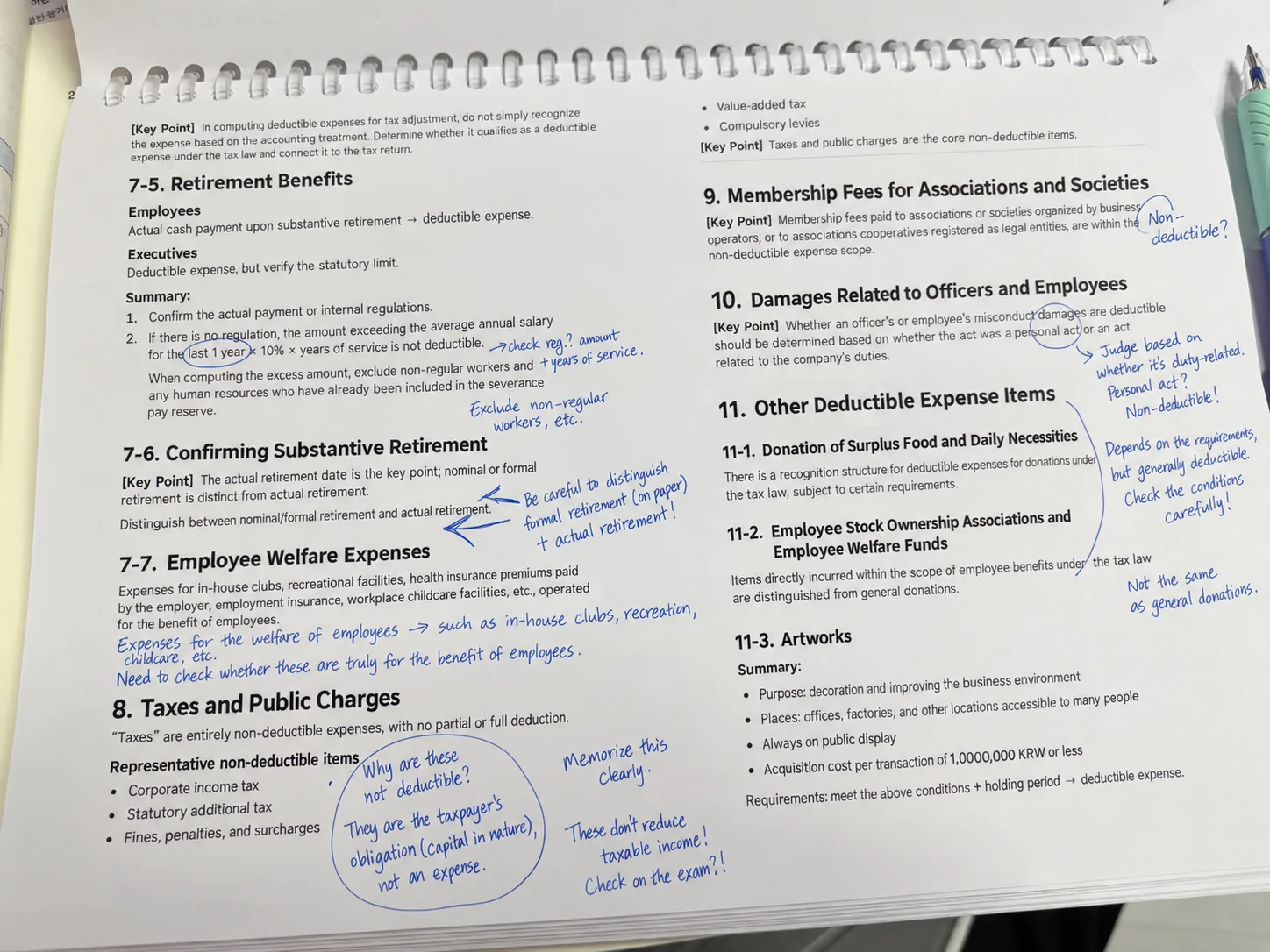
To answer “Can ChatGPT summarize PDFs accurately?”, I compare the outline with the notes I still make against the source. My study page is not a polished final document. It is where I circle limits, add questions, and write short reminders beside topics such as retirement benefits, employee welfare expenses, taxes and public charges, membership fees, and other deductible-expense items.
Those notes do not mean I had mastered every rule. They show where I stopped trusting the summary on its own.
The useful question is not “Did the model make the topic easier to read?” It is:
Which original page would I need to reopen before I relied on this in an answer?
For this type of material, I reopen the source when the point depends on:
- a defined term
- a condition or an exception
- a numeric threshold, period, or calculation
- the order in which a rule is applied
- a worked example that changes the result
The first pass can tell me where to look. It should not quietly replace the close reading.
Uploading the PDF is not the part I worry about
The hard part is not getting the file into ChatGPT. It is knowing whether the model actually saw the detail that changes the answer.
OpenAI’s current guidance notes that files can be too large, complex, image-heavy, or poorly structured for complete analysis, and that exact values may not be extracted reliably from scanned PDFs, image-based tables, or complex visual layouts. Data analysis with ChatGPT
That is why I give the summary a smaller job: help me find the structure, then tell me where to look again.
The instruction I now add before I trust the summary
The answer to “Can ChatGPT summarize PDFs accurately?” depends partly on whether the prompt leaves a trail back to the source. A broad request gives me a broad answer, so I ask for that trail directly:
Organize these PDFs into a study outline. For each heading, include the source document and page number. Flag rules involving a number, definition, exception, holding period, or calculation. If the source does not state something directly, write “not found” rather than infer it.
This does not make every page reference correct. It makes the next step less vague. Instead of searching the whole document again, I have a short list of places to inspect.
For a point that may matter in an exam answer, I make the question even smaller:
Which source pages should I reopen before relying on this rule? Explain what could change the answer on each page.
Then I open those pages.
If the evidence is visual, I open the visual
Tables, scans, charts, and handwritten notes are where I am least willing to trust a clean text summary.
On many ChatGPT plans, document retrieval is text-first, so embedded images, charts, and scanned tables may not be handled the same way as the visible PDF page. OpenAI currently documents full visual retrieval for PDFs as an Enterprise feature. It also says that PDFs uploaded as Project Files or GPT Knowledge are text-only, even though PDFs uploaded during an Enterprise conversation can use visual retrieval. File Uploads FAQ Visual Retrieval with PDFs FAQ
My rule is simpler than the product documentation: if the evidence is visual, I open the visual. A summary of a table is not the table. A summary of a margin note is not the note.
What I still trust the summary to do
So, can ChatGPT summarize PDFs accurately? It can organize the material well enough to reduce the search space, but I am not trying to read every PDF twice from beginning to end. That would throw away the useful part.
I trust the first pass to reduce the search space: show me the structure, group related topics, and point me toward the pages that seem to carry the real weight.
Then I reopen the smaller set where a missed condition could change the answer.
That is the role I want AI to play here: save me from aimless reading, not convince me the careful reading is already done.