
Use Memory for preferences you want across chats. Use a Project for one ongoing body of work, with its rules, files, and related conversations kept together. A reference file holds the wording you need to check; memory is not a substitute for reopening that source.
For a first setup, keep your current memory mode. Choose one rule that applies only to the project and one reference file. Save the rule in Project instructions, add the file to Sources, then check that ChatGPT states the rule and quotes a passage you can find in the file.
Start with one project rule and one file, or compare what belongs in each place.
Edited cover composite based on my desk and rear-view photos, with the VEYREM Project screen localized into English. This cover is an illustration of the workflow, not an unedited evidence screenshot.

My VEYREM Project has two PDFs in its Sources tab: VEYREM Brand OS.pdf and VEYREM OS.pdf. Seeing them there made the question more concrete: what belongs in those files, what belongs in Project instructions, and what should ChatGPT remember beyond this project?
Memory can personalize chats using relevant context from conversations and other available sources. Projects keep the chats, files, and instructions for one body of work together.
My ChatGPT Memory vs Projects rule for recurring work is to keep cross-chat preferences in Memory, project rules in Project instructions, and reference material in files. If the work continues across sessions, I’d also keep a short note of the latest decision and next step.
This article uses my VEYREM setup as an example. The basic rule-and-file path was checked against current official documentation and the web controls on October 30, 2026. It does not require changing memory modes. Earlier detailed rules remain dated notes, separate from this control check and from any test of what a chat remembers.
In this article
ChatGPT Memory vs Projects: Where Each Kind of Context Belongs
Projects also have memory behavior of their own, so the choice involves both where I store information and which chats may use it. OpenAI Help Center — Projects in ChatGPT
To decide where something belongs, I ask: should ChatGPT use this in unrelated chats, or only for this project?
| Context | Where I would put it | Why |
|---|---|---|
| A preference that should follow me into unrelated chats | Memory | It belongs with context I want ChatGPT to use beyond one project, not one project’s source material. |
| Rules for one ongoing project | Project instructions | It should guide this project without changing unrelated chats. |
| PDFs, reference articles, briefs, spreadsheets, screenshots | Project files | I want the actual source available, not a remembered summary of it. |
| Past decisions and chats about the same work | Project chats / Project memory | The history is useful inside the project without becoming a universal preference. |
I wouldn't ask ChatGPT to remember a project rule everywhere just to avoid repeating it.
“VEYREM writes for English-speaking readers” may be useful inside the VEYREM Project. It does not need to influence a tax-study chat, a travel plan, or some random software question six weeks later.
I would keep that audience rule in the VEYREM Project instructions.
Memory is useful when the context should follow me
On October 30, 2026, the checked web account showed ChatGPT Memory under Settings → Personalization, with an enable control, a memory summary, and access to saved-memory management. These are the controls observed on that account, not a promise that every plan or client has the same layout.
Where the memory summary is available, it is a high-level view of context used for personalization, not a complete inventory of everything ChatGPT may reference. OpenAI Help Center — Memory in ChatGPT
I’d use Memory for an explanation preference or a long-running personal goal I want carried into unrelated chats.
For rules I need followed exactly, I want the wording in a file or Project instruction I can reopen.
For a preference I do want across unrelated chats, an example request is:
Remember that I prefer explanations with a short answer first, followed by the steps and caveats.Then open Settings → Personalization and inspect the ChatGPT Memory controls your account provides. Check the saved wording rather than assuming the request saved exactly what you meant. Put instructions that must always apply in explicit custom or project instructions.
If a project-specific fact appears there by mistake, correct or remove it using the available controls, then put the current fact in the project’s explicit instructions or source material. Deleting the original chat alone does not necessarily delete a separate saved memory. OpenAI Help Center — Memory in ChatGPT
Projects are where I want the work itself to live
The Sources screenshot below shows two reference files in my VEYREM Project. It confirms that the files are there; it does not show whether ChatGPT has applied every rule in them correctly.
My content board is in Notion, where I track article order and status. That is separate from the ChatGPT Project’s source list.
I can open a file from the Project's source list to check its wording. OpenAI Help Center — Projects in ChatGPT
English-localized editorial reconstruction of my Korean screenshot. UI labels and filenames were translated; the layout, file order, and dates were preserved. The source list shows VEYREM Brand OS.pdf and VEYREM OS.pdf as explicit project files.
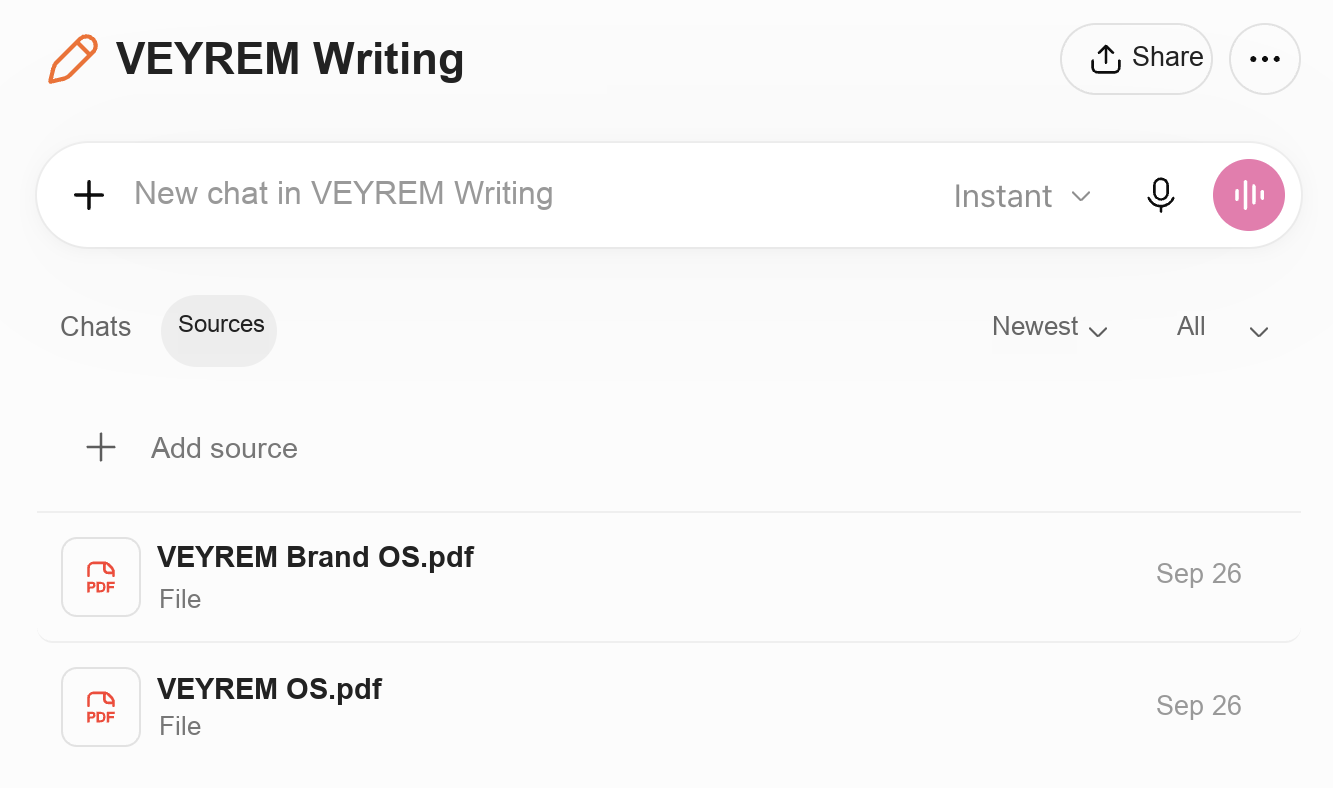
Optional: if this project needs to stay separate from other chats
Memory-mode notes: October 30 controls and earlier documentation
Localized editorial reconstruction of my original Korean screenshot for English readers. The wording was translated; the meaning and sequence were kept unchanged. This settings image is a reference for the optional memory-mode discussion, not a step in the first exercise.
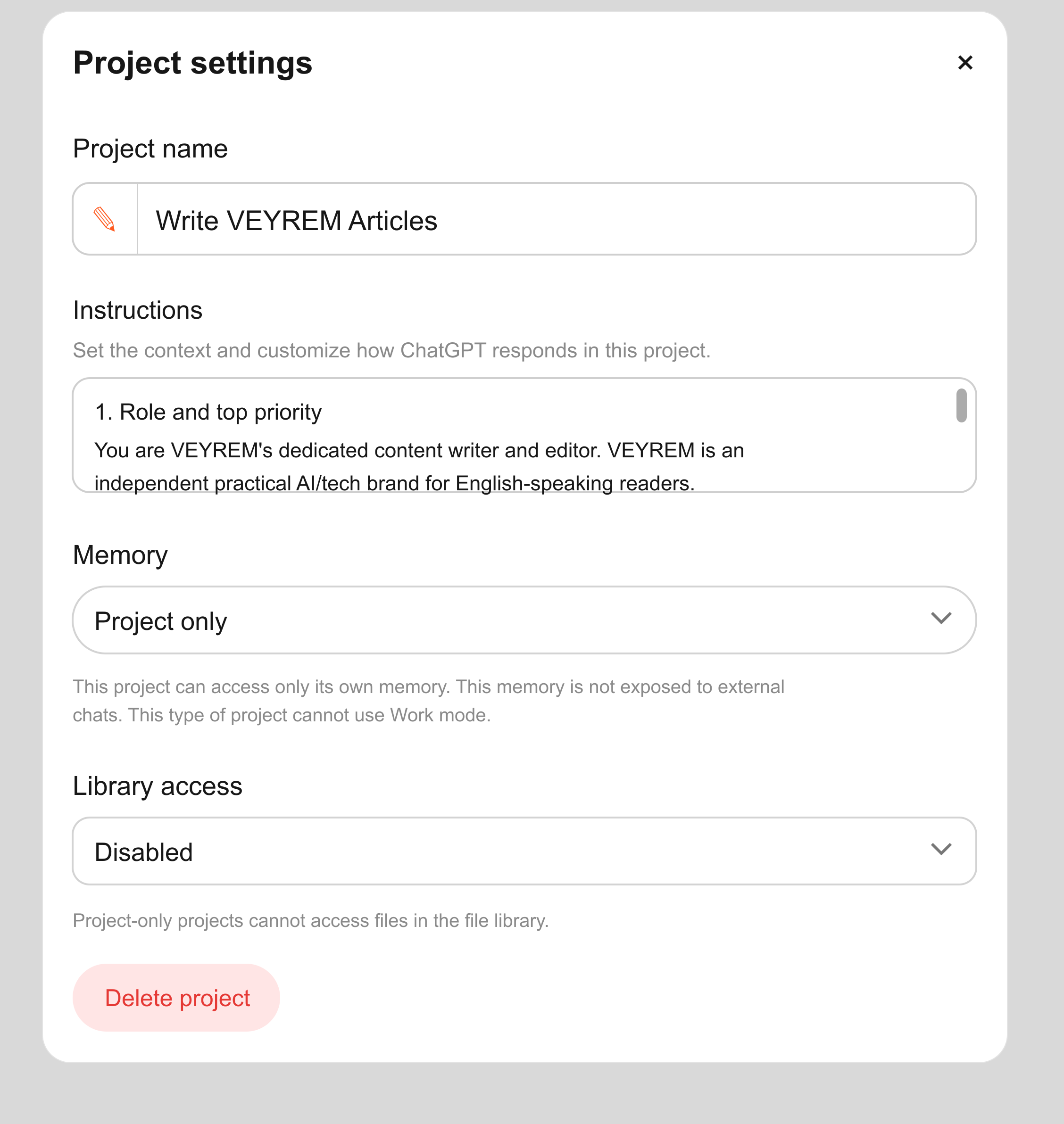
Web control check—October 30, 2026: An existing project showed Project-only selected. Its help text said the project uses its own memory, does not expose that memory to outside chats, and cannot use Work mode. This is a reading of the displayed controls, not a controlled isolation test. The basic exercise below does not change this setting.
A separate decision: the following row concerns isolation, not where to put your first rule or reference file. Compare it with the dated observations and source notes below before deciding whether a mode change is needed.
| Context | Where I would put it | Why |
|---|---|---|
| Work that should stay isolated from other chats | Project-only memory | It keeps the project’s chats separate from chats and memories outside it. |
Keep these earlier documentation notes separate from the October 30 account check. Cross-plan behavior and shared-project rules were not retested for every account.
Project-only memory is worth checking when you want the project's conversations kept separate from other chats. It isn't a prerequisite for trying the rule-and-file setup below.
The October 16 source notes describe Projects using either Default memory or Project-only memory. With Project-only memory, chats can reference other conversations in the same project, but they do not use your previously saved memories. They cannot reference conversations outside the project, and outside chats cannot reference conversations inside it. Shared Projects use Project-only memory automatically. OpenAI Help Center — Projects in ChatGPT
With Default memory, access to chats outside the project depends on your plan and workspace settings. OpenAI documents different behavior for Enterprise/Edu and other subscriptions. Check the conditions for your account before relying on outside chats.
For a brand project, I’d consider Project-only memory when unrelated personal context would get in the way. The October 16 source notes say ChatGPT Work was not available in a Project-only memory project. If I need Work, I have to weigh that against keeping the project's context separate. OpenAI Help Center — Projects in ChatGPT
Earlier conversation-removal note:
I can reopen a source file, but I cannot open a complete list of what Project memory remembers. OpenAI says ChatGPT may use context from other conversations in the same project, and if I want a particular conversation ignored, I need to delete it or, when the project settings allow it, move it to another project. OpenAI Help Center — Projects in ChatGPT
If Work is needed, first read the mode’s displayed restrictions; the checked Project-only project said Work was unavailable.
The part I would not leave to Project memory
I can reopen a source file and compare it with an answer. That is the check I want for a required rule or a current decision; a helpful remembered summary is not a substitute for wording I can inspect.
When I’ll be coming back in another chat, I leave a short note on where I stopped and what I want to do next.
For your first try, start with one project rule and one reference file. Leave a note for next time if the work will continue in another chat. I’d check those pieces in the next reply before using it to continue the work.
Put the short, always-on rules in Project instructions
In the web layout checked October 30, 2026, open Projects, use the project’s ••• actions menu, and choose Project settings. Add the rule in Instructions. The current Projects guide confirms that project instructions apply across that project’s chats. Labels may be translated in your account.
For your own project, add one rule you want every chat in that project to follow—for example, “Explain unfamiliar terms in plain English.” For a writing project like VEYREM, a fuller suggested instruction is:
Write for English-speaking readers in natural American English. Separate firsthand observations from documentation-backed claims. Never invent tests, results, quotes, or screenshots. If evidence is missing, identify what is missing and narrow the claim. Use the dated reference files for detailed editorial policy; flag conflicts before drafting.
Use rules that apply throughout your project here. Keep changing details, such as which article is next, in the short work note below.
Keep the full policy in a file you can open
In the project's Sources area, add one file you already use for the work: your class notes, a report, or a writing guide. Open it from the source list afterward and check its title, date if shown, and contents. You don't need a document called an OS; that is the name I use for VEYREM's reference guides.
For future revisions, I would use a filename such as veyrem-editorial-policy-2026-10-09.pdf and put the effective date inside the document too. That is a suggested naming convention, not the filename in my screenshot.
When replacing a policy, first confirm the new file opens correctly. Keep a backup outside the project before removing the old copy. In a shared project, removing a file removes it for everyone. Do not treat a newer filename as proof that ChatGPT used the newer policy.
Open a new ChatGPT conversation inside your Project and send this request before drafting. If you have a current work note, paste it into that conversation first.
Tell me the project rule you will follow.
Quote one relevant passage from the reference file.
Name the file, including its date if shown.
Do not guess dates or page numbers.
If I've supplied a current work note,
tell me the next step from it too.
If you can't find or open something,
or the instructions conflict, say so.
Don't fill gaps from memory
or choose between conflicting versions for me.
Open the named file and compare the quotation with the original. Check that the stated project rule matches what you saved in Project settings. If you supplied a work note, check the next step against it too. If ChatGPT uses an old file, misses a supplied note, or finds conflicting instructions, fix that specific issue before asking it to continue. This checks the material for this task; it doesn't guarantee that every future answer will use it correctly.
If the work continues, leave a short note for next time
I track VEYREM's article order and status on a Notion board. You don't need a board for your own work. In a chat inside your Project, paste a note with the latest decision and next step. You can also keep it as a project source.
For a first note, fill in these four lines:
Updated: [date and time, with timezone]
Task: [what you are working on]
Current decision: [what you have agreed to do]
Next step: [one specific action]
For more involved work, add the current stage, source filenames and versions, missing evidence, and which earlier decision this note replaces. Keep the latest note current when those details change. If you also use a board like mine, updating the board doesn't update a note already pasted into ChatGPT.
How I’d start or move an existing workflow
For this first exercise, keep your current memory mode. Reopen Project settings to confirm the rule, then open the reference file and compare one quoted passage. If you supplied a current-work note, check its next step too. Assess isolation and Work restrictions separately in the optional mode notes.
Earlier mode-change procedure—October 16 documentation note
This earlier procedure and its delay estimate were not retested on October 30. They are not steps in the basic exercise.
Open the project, select ••• → Project settings → Memory, and check the current mode. If you decide to change it, choose the mode and select Save. The earlier source notes say the change can take a few hours to apply, so the very next answer is not proof of the final behavior. Check the ChatGPT Work restriction above before choosing Project-only memory. OpenAI Help Center — Projects in ChatGPT
Before moving more material, check one item from each layer:
- Cross-chat preference: inspect the Memory controls for the preference you actually want everywhere.
- Project rule: reopen Project settings and confirm the rule is present.
- Exact source: open the uploaded file and check its effective date and contents.
- Current decision, if supplied: compare the work note with your latest decision. If you also use a task board, check that they agree.
If a setting is missing, check account and workspace availability in the linked official documentation rather than assuming the same menu exists for everyone. If a source cannot be opened or a decision is out of date, fix that specific item before using it to draft.
Once these checks pass, try one small task. For a writing example, see my ChatGPT Projects for writing setup.
Evidence and check dates
- Tool: The VEYREM ChatGPT Project source list, plus product documentation.
- Model: Not applicable to the source-list observation; no model comparison was run.
- Dates: Earlier detailed source check: October 16; general documentation review: October 23, 2026. Current Projects/Memory documentation and web controls checked October 30, 2026; no new memory-isolation experiment.
- Input: The two visible VEYREM reference PDFs, project rules, and suggested current-work notes.
- What was checked: Recorded observation: the reference files appeared in Sources. The rule/file/current-note setup is recommended, not tested end to end.
- Not checked: No controlled isolation test, end-to-end setup trial, or proof that every file rule was used. Cross-plan and shared-project behavior were not exhaustively tested.
Source status: Rechecked October 30, 2026: Projects and chats, Memories, and Personalize ChatGPT. They support shared project context and the distinction between memory and explicit guidance. The same-day web check confirmed the visible instruction and memory controls, including the displayed Project-only Work restriction. Older detailed notes remain separately dated.