
Suppose your biology notes keep sending you back and forth between diffusion and osmosis. Start with one shared idea, passive movement, then give each concept its own branch. On the osmosis branch, put the detail you need to remember: water moves across a selectively permeable membrane. That’s the first thing to look for when you open your study mind map.
AI-edited editorial composite based on portrait and sea-view photos. The laptop shows a real Gemini Notebook screenshot from an earlier session; the walkthrough uses the original practice notes below.
On this page
Bring the smallest useful set of sources
Open Gemini Notebook on a computer. The mobile app currently lacks Mind Maps. Start a new notebook for the pair so the map has a small set of material to work from. Select Add sources and add a short set of notes you wrote yourself, or material you have permission to upload, covering both ideas. A textbook being free to read does not automatically allow uploading it to an AI tool.
To try the same example, choose the copied-text source option and paste the original practice notes below. We prepared this short teaching example for the walkthrough; you can reuse it in your notebook. The dye and sugar examples are illustrations, not observations from our own experiments.
VEYREM practice notes: diffusion and osmosis
Original practice text prepared for this demonstration.

Shared idea
Diffusion and osmosis are passive processes: they do not require a cell to spend metabolic energy on the movement described here. Particles keep moving randomly; a concentration difference can produce net movement.

Diffusion
Diffusion is the net spreading of particles from a region where those particles are more concentrated to one where they are less concentrated. It can happen without a membrane. Illustrative example: dye spreads through still water after a drop is added. This is a teaching example, not a measurement from our own experiment.

Osmosis
Osmosis is a special case of diffusion involving water crossing a selectively permeable membrane. The membrane lets water through while restricting certain dissolved particles. When pressure is equal on both sides, net water movement is toward the side with more of those restricted dissolved particles. Illustrative example: two compartments are separated by a membrane that passes water but not sugar; water initially moves toward the compartment with more dissolved sugar.

Differences to remember
Diffusion can describe many kinds of particles; osmosis here describes water. Diffusion does not always need a membrane; osmosis does. Osmosis is included within diffusion, rather than being an unrelated process.

Boundary case
At equilibrium, particles can still cross in both directions even when there is no net movement. A diagram should not suggest that all particle motion stops. Differences in pressure can also balance osmotic water movement; solute concentration alone is not a complete rule for every situation.
Ask for the relationships before generating the map
Replace [Concept A] and [Concept B] with your own concepts. Keep [NOT FOUND] unchanged; it is the label for a missing relationship, not an input field. Paste the request into the notebook chat and send it.
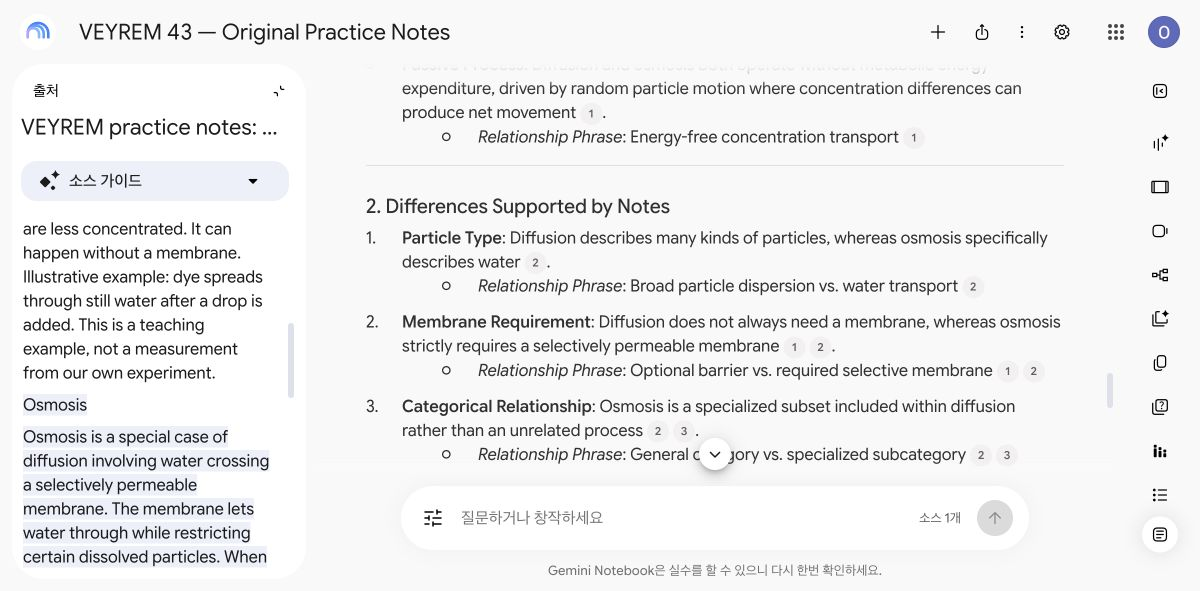
Using only the sources in this notebook, help me separate [Concept A] and [Concept B].

Return:
1. One shared idea
2. Up to three differences supported by the notes
3. A short relationship phrase for each connection
4. One source-backed example for each concept
5. One exception or boundary case, if the sources include one

Cite the source for every item.
If a relationship is not stated or supported, write [NOT FOUND] instead of guessing.
Preserve any conditions or limits in the notes; do not turn a conditional statement into a universal rule.
Keep each item short enough to use as a mind-map node.
Keep the chat answer handy. It gives you a compact comparison while the Mind Map draws its branches from the notebook sources.
Generate a Study Mind Map
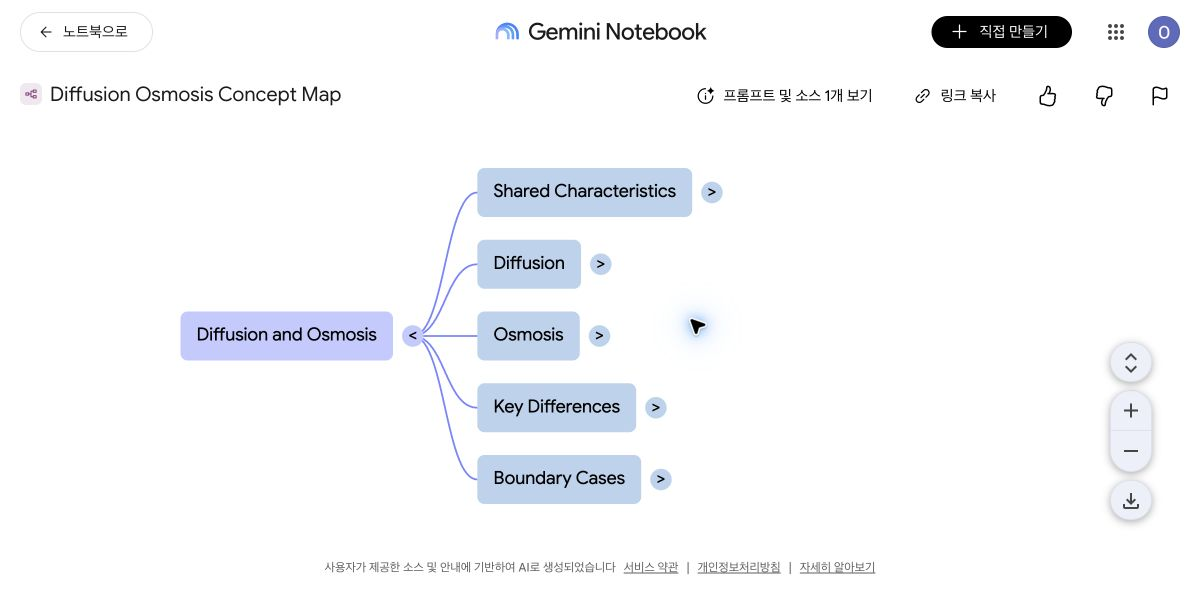
On desktop, open Studio → Mind Map, choose your source and language, then select Generate now. Open the saved map in Studio. If you see a Mind Map chip in the chat, Google’s guide also describes using it and opening the result from Studio. I generated a map from these practice notes using Studio. Open in new tab gives the interactive map more room.
Start at the center, then read in this order:
- Find the shared topic or parent idea.
- Look for your two concepts. One may appear underneath the other. If the map skips either one, use the chat comparison for that part.
- Find an example you can explain in your own words.
You can zoom, collapse branches, and select a node to ask a question about that topic. If the map is crowded, collapse unrelated branches instead of trying to memorize the whole page.
Check one connection against your notes
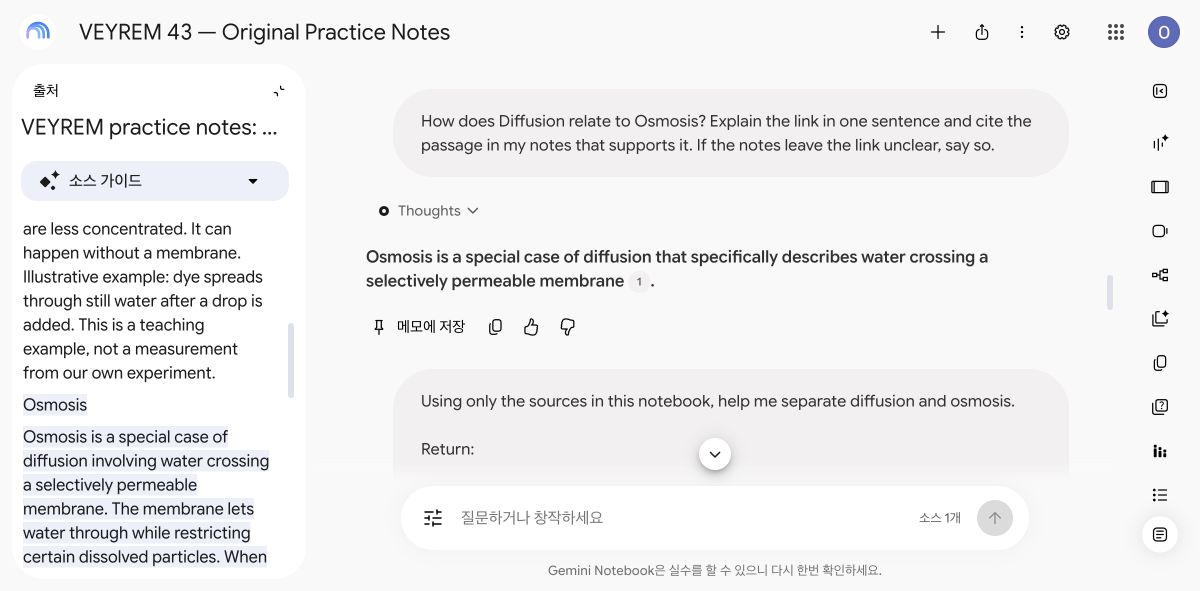
Pick the connection you’re least sure you could explain. In the notebook chat, name the two labels the line joins and send this request.
How does [first label from the map] relate to [second label from the map]? Explain the link in one sentence and cite the passage in my notes that supports it. If the notes leave the link unclear, say so.Useful relationship phrases include causes, requires, is a type of, contrasts with, happens before, and is an exception to. Use only the phrase your source actually supports.
Open the citation and check that the passage describes the same relationship. Jot down a missing condition or correction in your study notes beside the branch it belongs to. Our comparison still compressed the pressure boundary into “Pressure overriding solute rules,” even after we asked it to preserve conditions. The notes support the narrower statement that pressure differences can balance osmotic water movement. Keep that limit when you explain the branch.
Turn the map into a quick study check
Close or minimize the source notes for one minute. Point to each branch and explain:
- The shared idea in one sentence
- The main difference in one sentence
- One example for each concept
- An exception or boundary case, if your sources include one
Then reopen the sources and correct anything you overstated.
If a key relationship is wrong, correct or replace the relevant source, then generate a new map from that source set. Editing the chat comparison alone does not change the material the map draws from. Google’s help currently says regeneration starts by deleting the Mind Map note from its menu and creating it again.
Save the useful version
The Mind Map window provides a download option according to Google’s help, although publisher restrictions may affect some source types. You can also share the notebook so another user can load the same map in the Studio panel.
Use the two branches to practice one sentence you can say without looking: what the ideas share and the detail that tells them apart. Keep the map with your notes once that sentence holds up against the source.
Sources
- Google: Use Mind Maps in Gemini Notebook
- Google: Add sources to your notebook
- Original VEYREM practice notes: diffusion and osmosis, reproduced above for use in this walkthrough.
- OpenStax Biology 2e: Passive Transport