
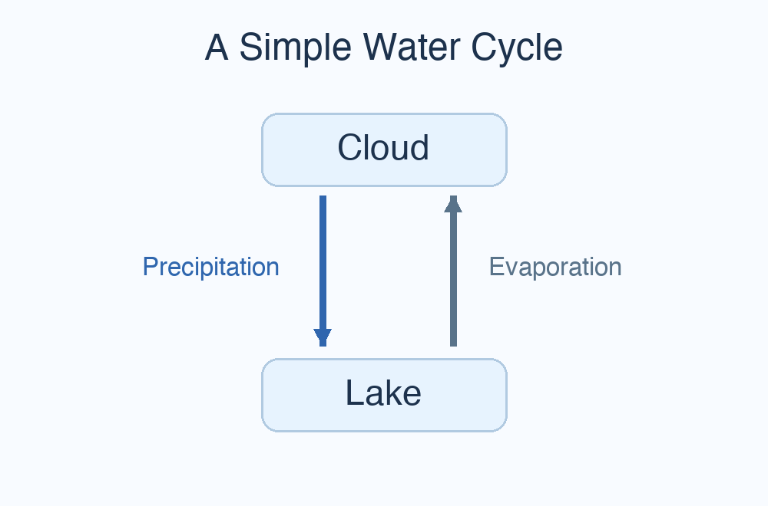
A diagram can make sense right up to one arrow. To explain a diagram with Gemini, start with one arrow: where it begins, where its tip lands, and what’s written beside it. In this water cycle sketch, the blue arrow runs from Cloud to Lake, with Precipitation beside it. That’s the connection I wanted Gemini to explain.
AI-generated editorial cover showing Som studying a water cycle diagram.
On this page
Explain a Diagram With Gemini
Start with a photo or screenshot of a diagram you’re allowed to share. Keep the arrowhead, the two labels it connects, and any words written along the arrow in the frame. If two arrows sit close together, name the labels on both ends. If the labels are missing, circle the arrow in a copy of the image without covering the tip.
On a computer, sign in at gemini.google.com and open a new chat. You can attach your diagram with the + button (Upload & tools) by choosing Upload files. Once you see your diagram thumbnail, you can paste the prompt below into the message box. Fill in the bracketed part, then send it. If two arrows connect the same labels, it helps to say which way yours points. For this diagram, I used “the downward arrow from Cloud to Lake.”

Help me follow one arrow in this diagram: [describe the arrow’s direction and the labels at both ends, or say which arrow you circled]. First tell me where the arrow starts and where its tip points. Copy any label printed beside it. Then explain in two short sentences what changes along that arrow and what it leads to. If something is unreadable or the diagram doesn’t show what happens, say so. Label any explanation you add from outside the diagram as background.The first reply got the arrow and its label right. It also said water collects in the lake, which the sketch doesn’t show, and put the diagram’s own title, “A Simple Water Cycle,” under “External Background Labeling.”
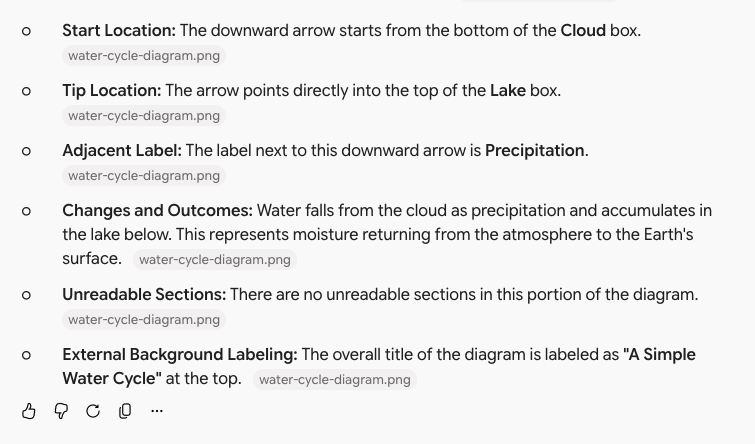
I tried the same prompt again in Gemini Pro. It read the same arrow from Cloud to Lake and copied the label “Precipitation.” This time, it said the sketch doesn’t show what happens along the arrow. It put the explanation about rain or snow falling and water collecting in the lake under “Background.”
Use the same check with a text answer: verify the source before you trust it and mark any detail you can’t find on the original page.
Trace the arrow back on the page
Look at where the arrow begins, then follow the line to its tip. Do the start, end, and label match the reply? If Gemini swapped the endpoints, use the direction you can see on the page. If you can’t read the label either, crop closer and attach a clearer picture before sending the request again. Keep both ends in that crop.
If the direction matches but you still can’t explain what changes, ask this in the same chat:
Explain just that arrow again in one plain sentence. Use the two labels from the diagram and tell me what moves or changes between them. If the diagram doesn’t show that, say so.In that same Pro chat, I asked for one plain sentence. Gemini said the arrow points from Cloud to Lake and that the sketch doesn’t explicitly show what moves or changes between them. With the diagram in front of you, try pointing to the tip and saying where the arrow goes and what it’s labeled. That gives you a quick way to check the reply before moving to the next connection.
Google Gemini Help: Upload and analyze images in the web app