
Yes, ChatGPT can read a link when it can retrieve the relevant text. I used to drop in a URL from a page I had open and assume we were looking at the same thing. Now I ask for the line behind the answer and open the page myself to check it.
If it can’t show the relevant passage, paste that part of the page, including the nearby conditions. Use a file when the question spans a long document.
For research in a regular ChatGPT conversation, I choose the input by the task:
- A link: to find sources.
- Pasted text: to check whether the relevant passage supports one sentence.
- A file: for questions across a long document.
Start with your link and one question. Copy this request into ChatGPT. Replace PAGE with the page URL and QUESTION with what you want to find out.
Use this page to answer my question. Read the relevant text; do not infer it from the URL or title.

Give a short answer and one short exact passage that supports it. Keep any conditions or exceptions that affect the answer. Tell me if you could read only part of the page. If you cannot read the relevant text, say CANNOT ACCESS or CANNOT VERIFY and tell me what passage to paste. Do not invent a quotation. Reply in English.

PAGE: [paste the page URL]
QUESTION: [write the question you want this page to answer]
Open the quoted passage yourself and compare its wording. If ChatGPT cannot show it, paste the relevant text and nearby exceptions into the sentence-check request below. No file upload is needed for this first check.
When a link can’t show the passage
Practice input—editor-written: Source text: “This guide covers text files. It does not assess images.” Draft sentence: “This guide covers text files and images.” This is a fictional passage for practice, not an OpenAI product claim.
What to check: The reply should reject the claim that the guide covers images and keep the limit in its revision: “This guide covers text files; it does not assess images.” The label alone is not enough—compare the quotation and the revised sentence with the source.
Copy the request into ChatGPT. For practice, fill the two bracketed fields with the source text and draft sentence above. To check your own claim, use your sentence and the relevant passage, including any nearby conditions or exceptions.
Use only the source text below. Does it fully support my draft sentence?
Answer Supported, Partly supported, or Not supported.
Quote the wording that supports or limits the claim. Keep all plan names, conditions, and exceptions.
If the sentence is too broad, rewrite it without adding facts. If the supplied text is insufficient, say what is missing.

Source text:
[Paste the relevant passage and nearby conditions or exceptions.]

Draft sentence:
[Paste the sentence you want to check.]
Check that the reply quotes the supplied text and that its revision keeps the limit about images. If it adds a fact, remove that addition before using the sentence. The URL and file examples below explain when to change the input for a different task.
In this article
The cover is an AI-generated illustration of the three input choices. The two screenshots below show earlier URL and pasted-text checks.
Can ChatGPT read links? My URL check
For the URL check, I gave ChatGPT an OpenAI Help Center link and asked about images inside PDFs. I asked it to answer from that page and show the passage behind its answer.
The recorded response cited the page and named ChatGPT Enterprise, a workplace plan. In that reply, shortening the answer to “ChatGPT can read images in PDFs” would have dropped the plan and upload conditions.
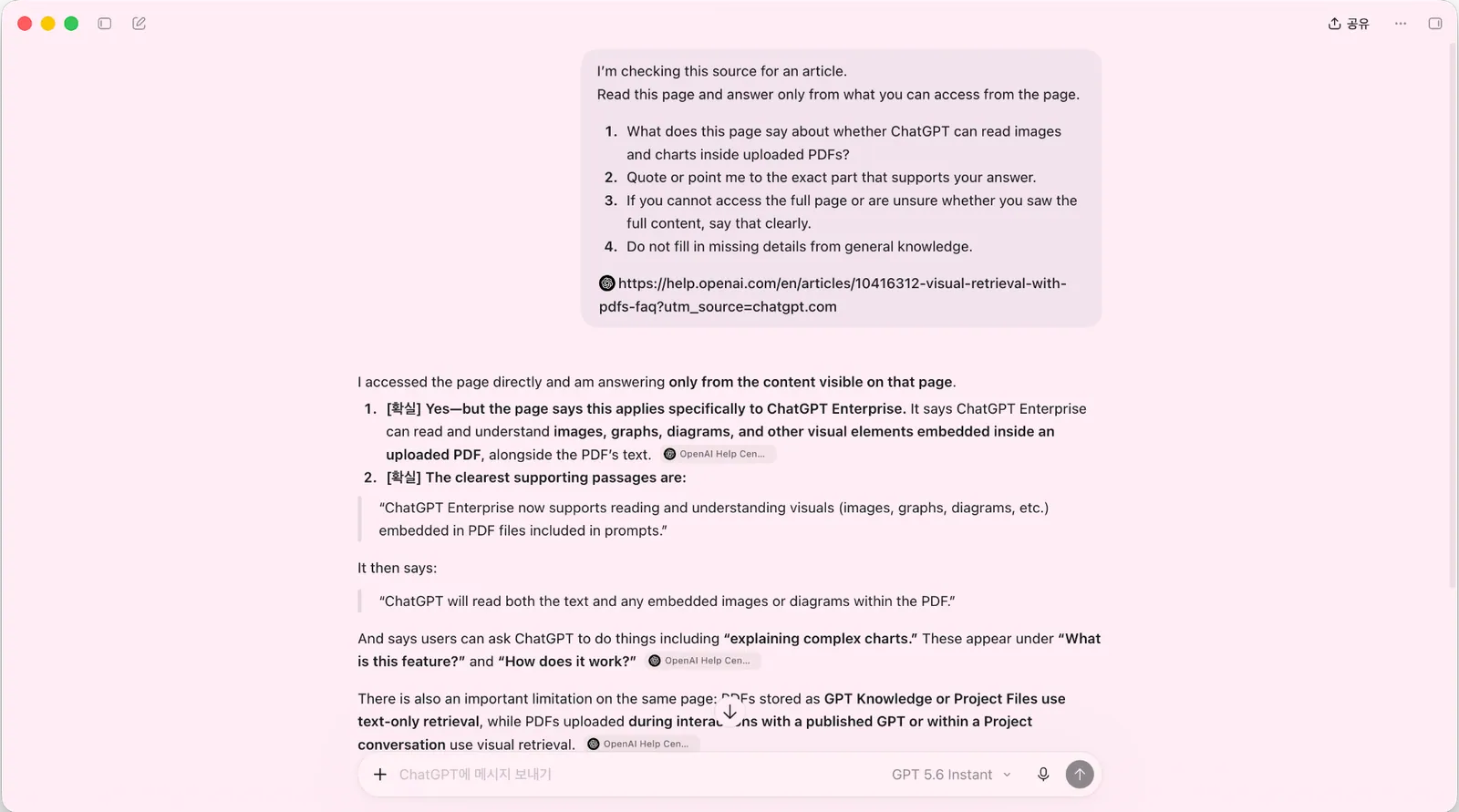
The answer kept the plan limit. I still needed to check the quoted passage against the page. A citation showed me where to look; it didn’t tell me that the whole page had been retrieved.
OpenAI’s Search guidance gives another reason to check: results and citations can be incomplete, outdated, or incorrect. It recommends opening the source to check the answer.
Earlier offline-search note—October 14 documentation check
There’s another wrinkle if your workspace uses offline web search. It searches stored web content, so a page can be missing or older than the one in your browser. Login-dependent pages or content loaded after opening may be incomplete, too. That applies to this workspace setup, not every ChatGPT account.
This older workspace-specific note was not reverified on October 30. It is not a claim about every current ChatGPT conversation.
If I couldn’t get the passage from the link, I’d copy it from the page myself. That brings me to the pasted-text check.
What changed when I pasted the passage
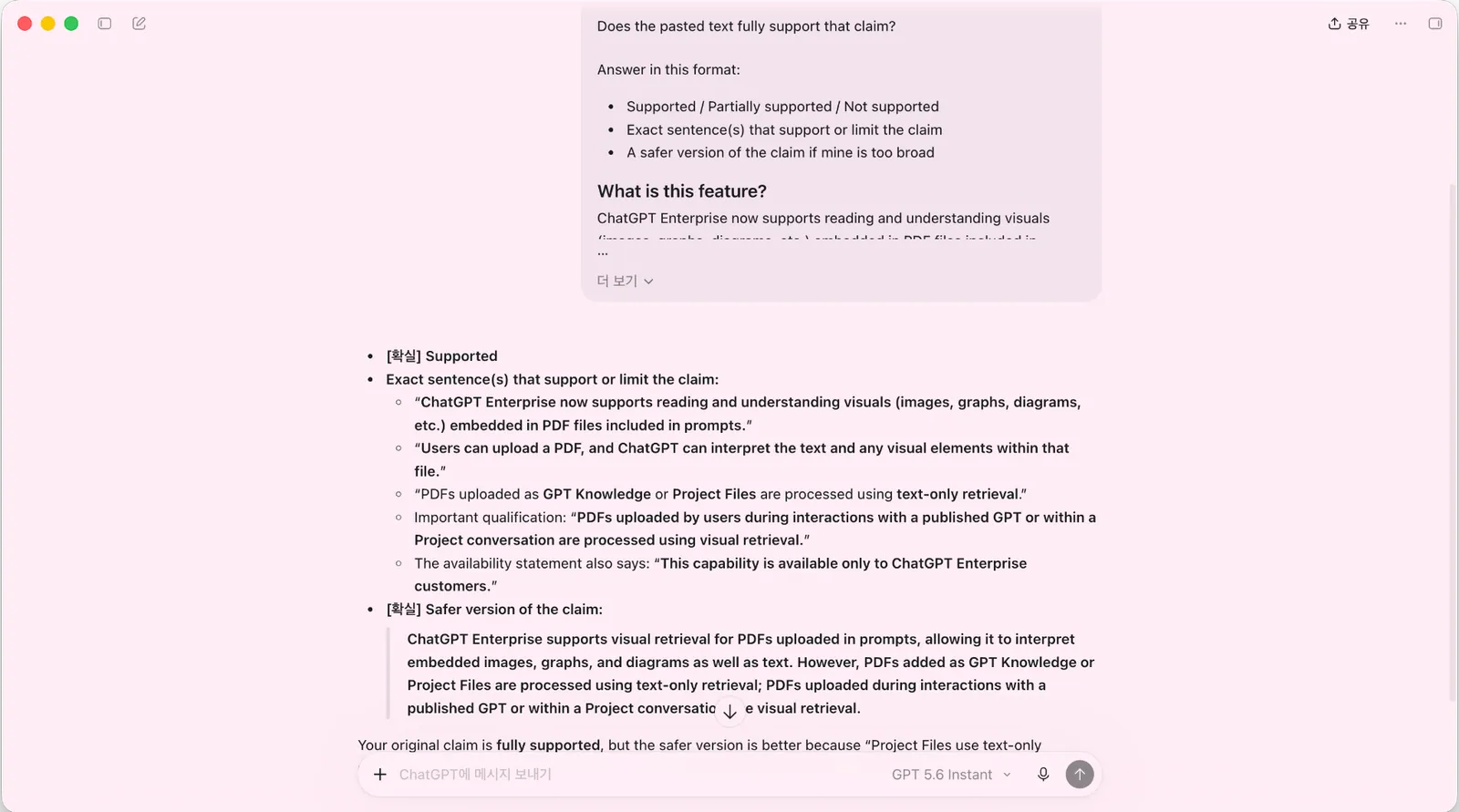
I also gave ChatGPT the relevant source passages and a draft claim, then asked whether the text fully supported the claim. This time, the answer marked it as supported and offered a more specific version of the sentence.
The rewrite kept both details I cared about: which plan the rule applied to and where the PDF had to be attached. I could check both against the passage I’d pasted.
When I checked the guide on October 14, 2026, it described chart and image support for PDFs attached in an Enterprise chat, including inside a Project conversation. It described text-only retrieval for PDFs stored as GPT Knowledge or Project files. Those were the conditions I checked in the two replies.
Of course, I’m still choosing what to paste. If I leave out an exception below the paragraph, ChatGPT may never see it. For a short policy paragraph or pricing note, I’d include the nearby limits and exceptions as well as the sentence I want checked.
Use the one-passage request at the start with your own source and sentence. The earlier screenshot records a separate check.
If the rewrite drops a condition or adds a detail, send this in the same chat:
Restore any conditions or exceptions you left out, remove details the supplied text doesn't support, and show the corrected sentence with the source wording behind it. If the text isn't enough, say what is missing.Open the passage again and check the revised sentence.
For a question that spans many sections, I’d move from a pasted passage to the file.
When a question needs the whole file
Pasting works for one claim, but a long report gives me a different problem: I may not know which sections matter yet. For that kind of question, I’d start with the document and ask ChatGPT to find the relevant sections.
In the web account checked on October 30, + → Add photos and files provided the upload route. If uploads are available, attach your report, then paste this request into the conversation. Replace the bracketed question with what you need to find.
Find the section that answers [my question]. Give me the section name and quote the supporting text. Use only the attached document; do not add facts or infer dates that it does not state. If you cannot read the relevant part or the document does not answer it, say which.Compare the quotation with the named section. Keep dates and conditions exactly as the document states them. If the file opens but does not contain the answer, a useful reply says that information is missing. If uploads are unavailable, paste the relevant passage and its conditions instead.
If you need to check a chart, attach the PDF in the chat. If ChatGPT can’t read the chart, upload it as a separate image with its labels and footnotes visible. PDFs saved as Project files or in GPT Knowledge may leave out embedded images. OpenAI’s upload guide explains how these attachments are handled. I didn’t run a separate file test.
Compare the numbers in the reply with the chart before relying on them. For a document-level example, see the PDF summary checks I use before studying.
What I’d choose for each task
| Input | What I’d use it for | What I still check |
|---|---|---|
| URL only | Find public sources and start research | Does the cited page contain the passage that supports the answer? |
| Pasted text | Check whether a specific passage supports one sentence | Did I include the nearby conditions and exceptions? |
| Uploaded file | Find sections or compare information across long documents | Which section supports the answer, and was any essential chart supplied as a readable visual? |
For a changing product limit, I’d start with the URL to find the current official page. Once I found the rule, I’d copy the full paragraph into the chat, including who it applies to and any exception. I’d use a file if that rule sat inside a longer report I needed to work through.
The question stays the same; I’m changing how I provide the source material.
What I’d send with the next question
If ChatGPT can retrieve the page, it can use a link to answer your question. Ask about one thing, then open the page and look for the line it quoted. If you can’t find it, paste the relevant paragraph with the nearby limits and check the new answer against that text.
For a fuller source-checking process, see How to Verify ChatGPT Sources Before You Trust an Answer.
Evidence and check dates
- Tool: ChatGPT for historical URL and pasted-text checks; documentation for file guidance.
- Model: Not recorded.
- Dates: Earlier detailed source-check note: October 14. General search/file review: October 23, 2026. Attachment/image guidance and web upload/search controls checked October 30. General attachment, Projects, image-input, and web-search documentation reviewed October 31, 2026; the two recorded replies were not rerun.
- Input: An OpenAI PDF-feature URL; separately, its passages plus a draft claim.
- What was checked: Recorded observation: the replies retained plan and upload conditions. The file workflow and copyable prompt are suggestions.
- Not checked: No separate file test, new account-interface test on October 31, controlled three-way comparison, or proof that the URL response retrieved every page word. The October 31 documentation review did not establish current detailed PDF plan/retrieval rules or offline-search availability.
Source status: Reviewed October 31, 2026: Use ChatGPT for general attachments, Projects and chats for shared sources, Image inputs for visual context, and Web search for search and source review. These are documentation checks, not file-processing tests. The October 30 account check remains separately dated. The detailed October 14 PDF/offline notes remain a historical snapshot, not current entitlement guidance.
Sources
General guidance reviewed October 31, 2026:
Earlier sources behind the recorded checks and historical notes: