
When an email thread gets long, I want to know what still needs my reply. Ask ChatGPT to pull out the questions you haven’t answered, the things you’ve been asked to do, and anything already settled. Then use those lists to draft your reply.
Try the fictional thread and copy the request below.

Table of Contents
Clean the email thread before you paste it
Remove email addresses, phone numbers, client names, contract details, account information, signatures, and anything else the model does not need. Replace them with labels such as [Organizer], [Client], and [Event]. Put the oldest message first and keep each sender’s name and the date and time.
Optional: Start an unsaved Temporary Chat if you don’t want the thread in your history. Choose Unpersonalized before your first message to leave out existing memories and custom instructions. Follow your workplace’s rules for email content.
You need:
- ChatGPT
- A cleaned email thread in oldest-to-newest order
- A final check against the original thread before sending
Use a short fictional thread first
This example is fictional and exists only to show the method.
Dana — Monday, 9:05 a.m.
Can you confirm the final attendee count by Wednesday? We also need the revised room layout.Me — Monday, 12:14 p.m.
The current attendee count is 42. I will confirm the final number tomorrow. The room layout is not decided yet.Dana — Tuesday, 8:20 a.m.
Thanks. Please tell me whether we should keep the classroom setup or switch to rounds. Can you also send the dietary restrictions?Jamie — Tuesday, 9:10 a.m.
I can collect the dietary restrictions if you confirm the cutoff.Me — Tuesday, 9:35 a.m.
Friday at noon works as the cutoff.
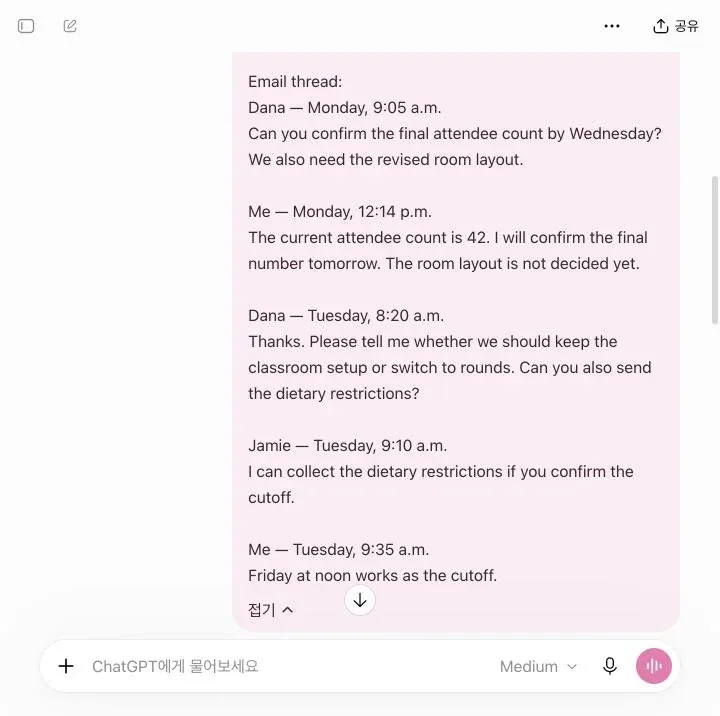
Open a new chat at ChatGPT and paste the request below. Replace [YOUR NAME OR LABEL] with the name used for you in the thread; for the sample above, use Me. Replace [PASTE YOUR CLEANED THREAD HERE] with the email messages, then send the request:
My name or label in this thread is [YOUR NAME OR LABEL].

Read the email thread below in chronological order. Create:

A. Questions I still need to answer
B. Requests I still need to act on
C. Items already answered or closed
D. A short reply draft that addresses only the open items

For every open item:
- Name who asked.
- Include a deadline only if it is explicit.
- Write "Not stated" when the deadline or owner is missing.
- Mark unclear ownership as "Confirm owner."
- Do not treat a question as open if a later message clearly answered it.
- Do not invent an answer. Use [ADD ANSWER] where I must supply one.

Email thread:
[PASTE YOUR CLEANED THREAD HERE]
What still needs a reply
In this example, the attendee count and room setup still need an answer. The Friday-noon cutoff is already settled:
| Type | Item | Asked by | Deadline | Status |
|---|---|---|---|---|
| Question to answer | Confirm final attendee count | Dana | Tuesday promised by me; Wednesday requested by Dana | Open |
| Question to answer | Choose classroom setup or rounds | Dana | Not stated | Open; confirm who will decide |
| Action request | Provide the revised room layout | Dana | Not stated | Confirm owner |
| Action request | Send dietary restrictions | Dana | Not stated | Confirm owner; Jamie offered to collect them |
| Closed item | Set dietary-restriction cutoff | Jamie | Friday at noon | Answered |
Here’s one way to reply, with the final count left for you to fill in:
Subject: Re: Event details
Hi Dana,
The final attendee count is [ADD FINAL COUNT]. Could you confirm who will choose the room setup and send the revised layout?Friday at noon is the cutoff for dietary restrictions. Jamie offered to collect the dietary restrictions. Could you confirm whether Jamie will handle collection and who will send the final list?
Thanks.
This is an example output, not an email from a real project.
When I tried this made-up thread on October 26, 2026, ChatGPT put me in charge of the room layout. I hadn’t agreed to that anywhere in the messages.
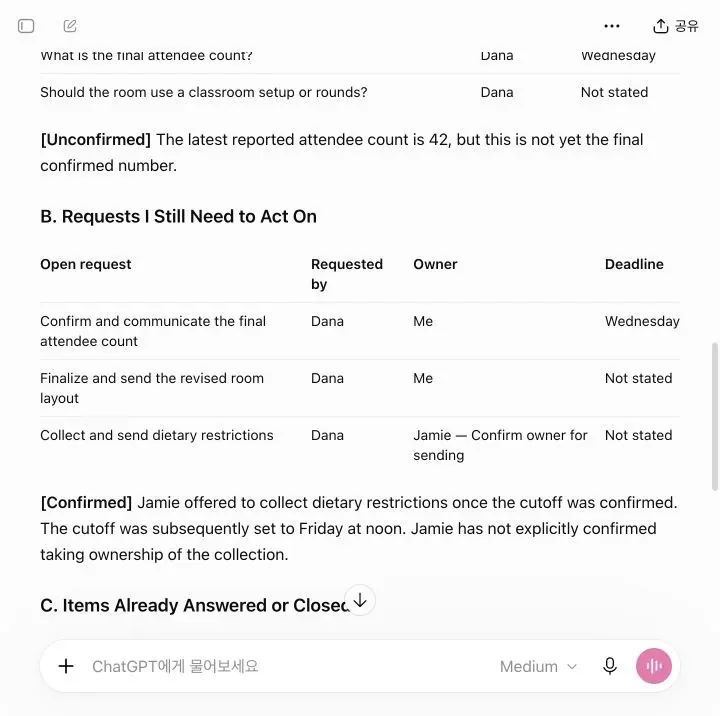
Check the draft against the thread
Before you send anything:
- Confirm that each open question appears in the original thread.
- Look for a later message that may already answer it.
- Check who owns each action; do not turn an offer into an assignment.
- Check requested deadlines and your own promises separately. In this sample, Monday’s “tomorrow” means Tuesday, even though Dana asked for Wednesday.
- Replace each bracketed field with your real answer, then remove sensitive material from the chat if your policy requires it.
If the lists and draft match your thread, skip the correction prompts. Use them only when ChatGPT misses an answer or adds a responsibility you didn’t agree to.
If the result still mixes open and closed items, send this correction:
Recheck the thread from oldest to newest. Move any item answered by a
later message into "Already answered." Do not turn an offer into an
assignment. Keep unclear ownership as "Confirm owner," and leave every
unknown answer as [ADD ANSWER].
That first correction didn’t fix the room-layout assignment. I had to tell ChatGPT exactly what it had added:
The thread does not explicitly assign the room-layout decision or
sending the revised layout to me. Mark that owner "Confirm owner"
in both the question list and action list, and remove "I'll send the
revised layout once finalized" from the reply. Ask who will confirm
the room setup and send the layout instead. Keep my explicit
attendee-count commitment. Do not add any new commitment.
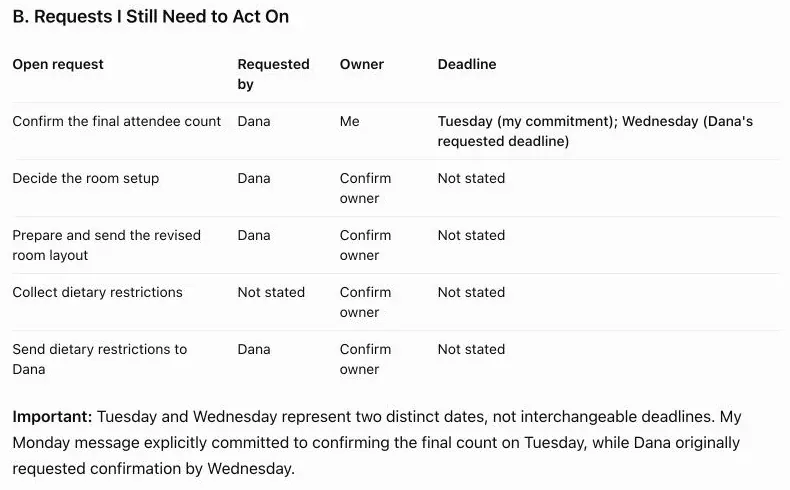
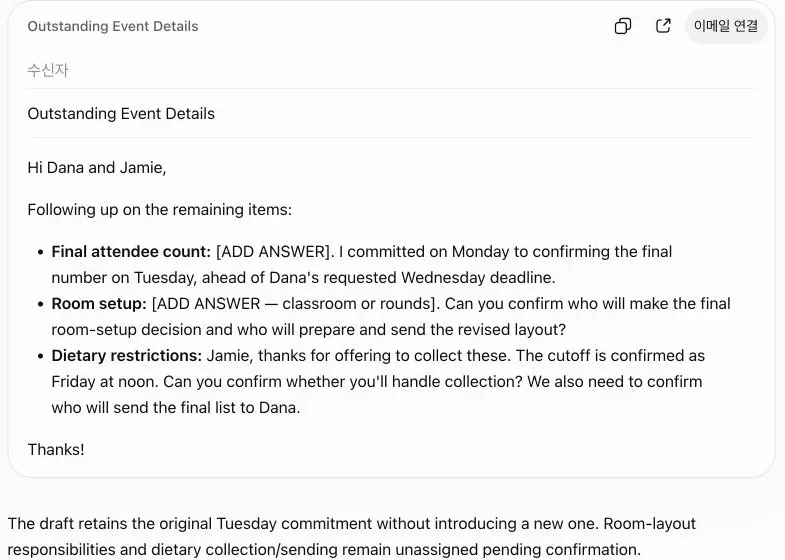
In the fictional thread, the person replying had promised Tuesday. ChatGPT’s draft changed that to Wednesday, which was Dana’s deadline. I asked it to keep the two dates separate. The screenshots show what came back after both corrections. In your own thread, check who promised each date before you send the reply.
Finish the reply in your email app
Start with one cleaned thread and the request above. Use the open-item lists to draft your reply, then check owners, promised dates, and missing answers against the original messages. Fill in your decisions and send the finished reply from your usual email app.
For a recurring reply workflow, see ChatGPT Memory vs Projects to decide where to keep general reply rules and reference files. Keep sensitive email content out of reusable context.
Sources
- OpenAI Help Center: Temporary Chat in ChatGPT, accessed October 26, 2026.
- OpenAI Help Center: Data Controls FAQ, accessed October 26, 2026.