
A self-review gets difficult when the blank page asks for a polished story but your real record is a pile of fragments: a calendar note, a checklist, a message you sent after fixing something, and a few numbers with no context.
To draft a self-review from work notes, ask Gemini to separate what happened, what you did, and what your notes actually show. “Shared the checklist,” for instance, can support a sentence about sharing it. It doesn’t tell you whether anyone used it.
We tried this in Gemini with four fictional work notes. For your own review, use only non-sensitive material your organization allows you to share, with names and confidential details removed. Access and data handling can differ for work or school accounts, so check your organization’s rules first.
This editorial composite uses the original café photo with the Gemini demo placed on the laptop screen.
On this page
What to prepare
Bring three things:
- The exact self-review question you need to answer.
- Three to six non-sensitive notes from the review period.
- Any evidence that already exists in those notes, such as a date, count, status change, or approved result.
Do not add a number simply because it would make the paragraph sound stronger. If the record does not support it, leave a marker to find it later.
Start with a small, anonymous example
We used these four fictional notes:
- Updated the weekly shipment tracker.
- Worked with quality control on missing labels before release.
- Shared the revised checklist with the APAC team.
- Found three exceptions before dispatch.
These lines still leave questions. Did you own the label fix, or support it? Did the checklist change a measurable result? Those details aren’t in the notes, so the draft should leave them open.
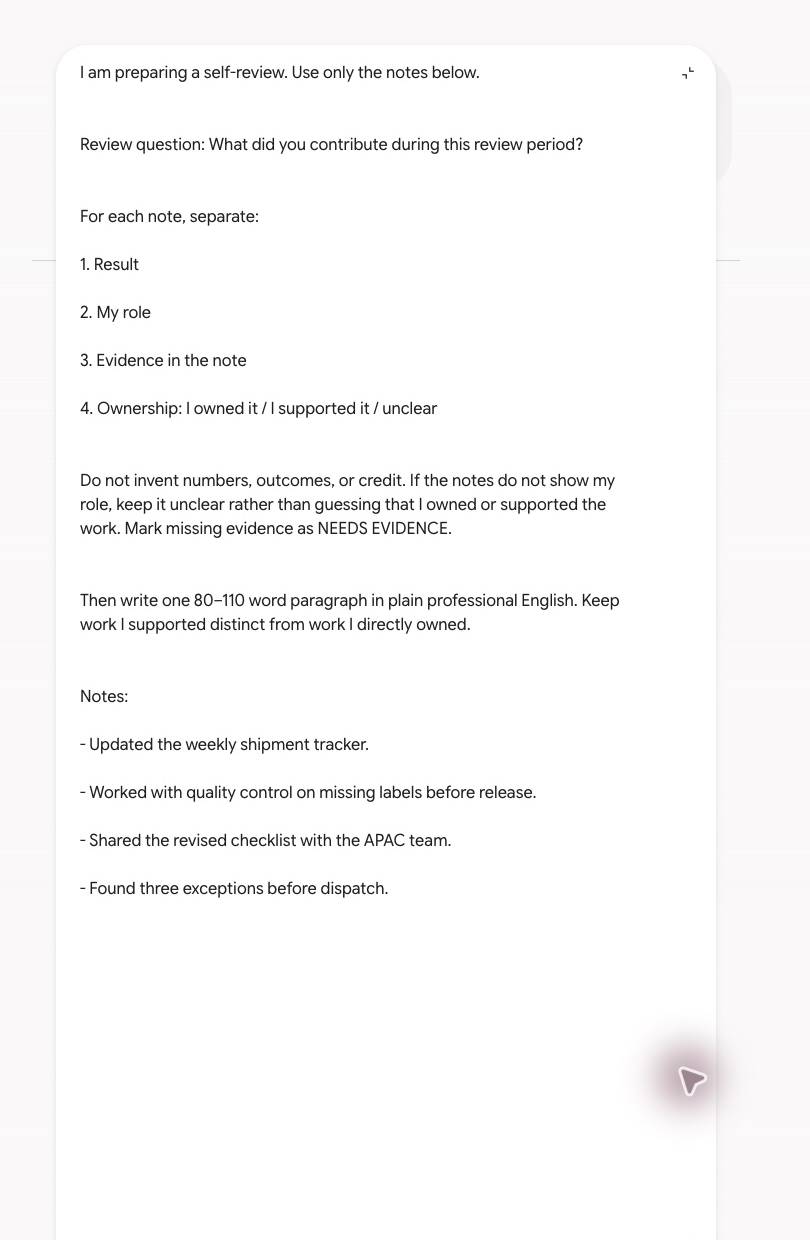
On a computer, open Gemini, sign in, and start a new chat. Paste the complete request below into the message box, replace the two input fields with your review question and anonymized notes, then select Submit. You can work with pasted text; no file upload or app connection is needed.
Draft a self-review from work notes
I am preparing a self-review. Use only the notes below.

Review question: [paste the exact question]

For each note, separate:
1. Result
2. My role
3. Evidence in the note
4. Ownership: I owned it / I supported it / unclear

Do not invent numbers, outcomes, or credit. If the notes do not show my role, keep it unclear rather than guessing that I owned or supported the work. Mark missing evidence as NEEDS EVIDENCE.

Then write one 80–110 word paragraph in plain professional English. Keep work I supported distinct from work I directly owned.

Notes:
[paste your anonymized notes]
Replace the bracketed parts. Keep the words NEEDS EVIDENCE as they are; they’re an output label, not another field to fill in. If your review form asks for a different length, change 80–110 words.
Read the structure before the paragraph
Read the four fields for each note before borrowing a sentence from the paragraph. They make it easier to see where a smooth sentence has gone beyond your notes.
Here is what the four notes actually support:
- “Found three exceptions before dispatch” has a result and evidence.
- “Updated the weekly shipment tracker” shows an action, but not its effect.
- “Worked with quality control” shows collaboration. It doesn’t establish who owned the fix or exactly what you contributed.
- “Shared the revised checklist” does not prove adoption or impact.
Gemini’s first completed response went further. It labeled the quality-control work as something we supported, even though the note only said “worked with.” The paragraph also added claims about regional alignment and keeping reporting current. Those outcomes were not in the notes.
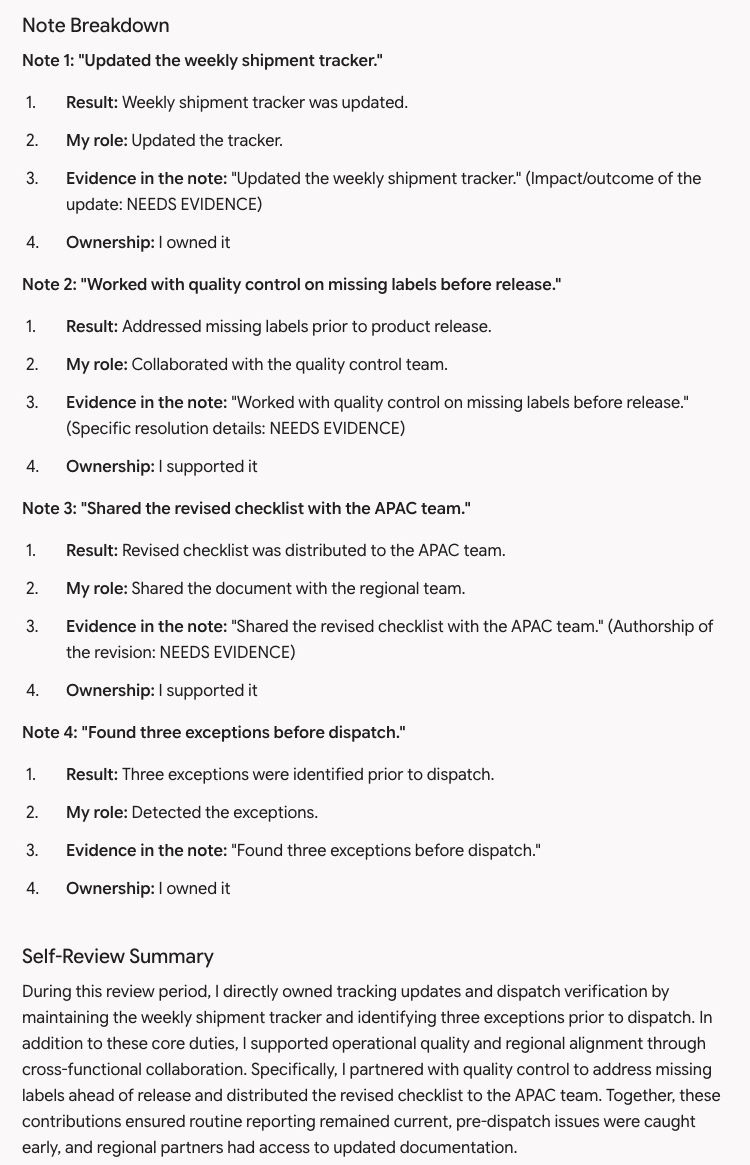
Keep the actions, remove the added claims
Our first follow-up removed unsupported role claims and kept the three exceptions tied to dispatch, but it shortened the paragraph to 72 words.
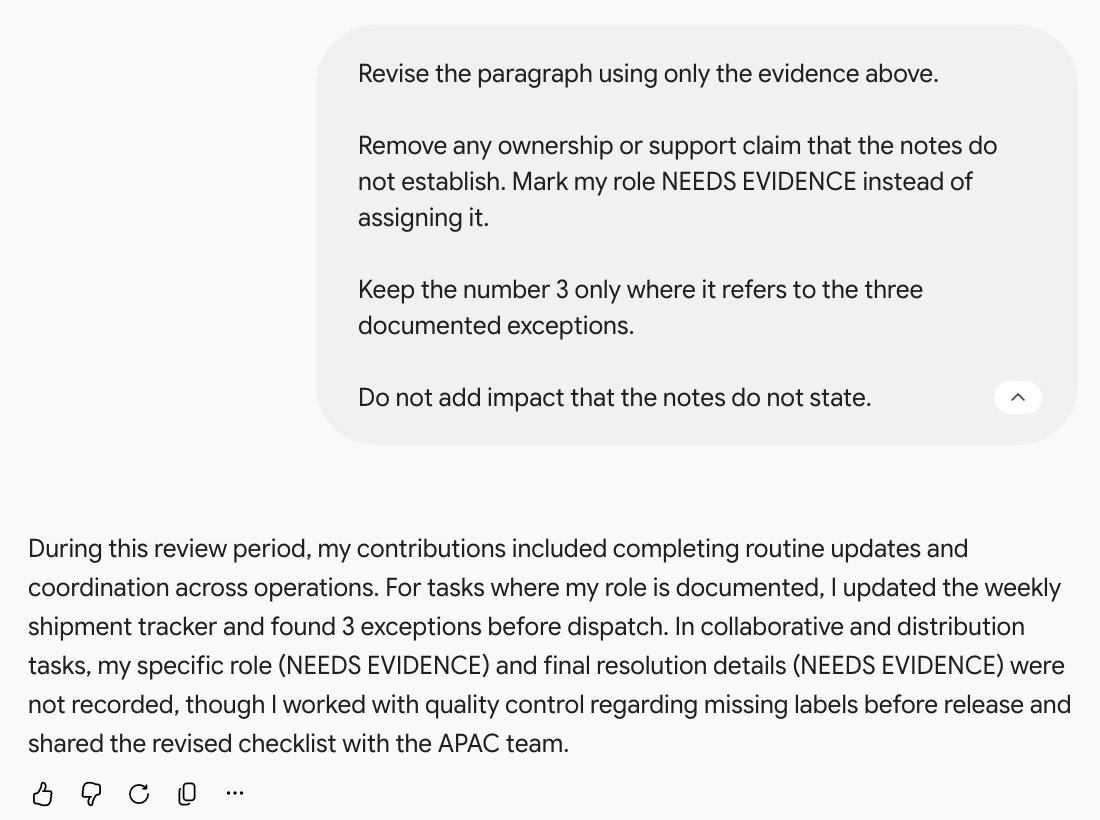
We added the 80–110-word limit back to the follow-up and removed the wording tied to our example. If your draft adds a role or result your notes do not establish, send this in the same Gemini chat:
Revise the paragraph using only my original notes above.
Keep the actions I recorded, but remove any claim about ownership, support, outcomes, or impact that the notes do not establish. Mark missing role or outcome details as NEEDS EVIDENCE.
For missing details, say they are not stated in my notes; do not imply that no record exists.
Keep each number tied to the same fact as in my notes. Do not add numbers.
Write one 80–110 word paragraph in plain professional English. Do not add claims just to reach the word count.
After the revised request, Gemini returned this 93-word paragraph:
During this review period, I updated the weekly shipment tracker, though the outcome is not stated in my notes (NEEDS EVIDENCE). I worked with quality control on missing labels before release; my specific role and the outcome are not stated in my notes (NEEDS EVIDENCE). Additionally, I shared the revised checklist with the APAC team, though my role in revising it and the outcome are not stated in my notes (NEEDS EVIDENCE). Finally, I found three exceptions before dispatch, though the outcome following that detection is not stated in my notes (NEEDS EVIDENCE).
It kept all four actions, retained the three exceptions, and described missing details as absent from the notes. The repeated labels make this a working draft: fill the gaps from your records, then remove the labels. If an outcome is still unknown, keep the action without adding an effect.
From the draft to your review form
Gemini can turn scattered work notes into a draft you can explain. Here, “found three exceptions before dispatch” can stay as an action. The notes still don’t tell us whether anyone used the checklist or how the label issue was resolved.
Before pasting your draft into the review form, read it alongside the question. Keep the actions your notes support, and add results only when you can explain where they came from.
If you’re reusing these notes for an application, match the job description to your experience and keep the action and evidence together.